
One-goal page
Goal tracker: a printable page and a simple way to track one goal

The short answer
A goal tracker works best with one goal per page. Decide how the goal is measured, like minutes, pages, money or simply done. Then fill in that day’s box at a time you already stop, and read the whole page once a month. Keep it that small for a week.
In 30 seconds
- Track one goal per page, so the page stays quick to fill in.
- Write how the goal is measured before you mark a single box.
- A smaller busy-day amount fills the box in full.
- Days add up. An empty box takes nothing away.
- Read the page at month end with three short questions.
Thirty-one small boxes, a yellow highlighter, and the soft click of the cap going back on.
That click is most of the reason paper trackers exist. The trouble starts when one page tries to hold nine goals, so this one holds a single goal, one of the small goals that fit inside an ordinary day.

Reading XP0 XP
What should a goal tracker track?
Before you draw any boxes, write one line under the goal: how I measure it.
Some goals only need done or not done. But for most, a plain tick throws away the good part, like the night you read 15 pages when the plan said 10.
So pick the unit first.
Here are five ways to measure a goal, each with one example week filled in.
| Track by | Example goal | A filled week |
|---|---|---|
| Time | Walk 20 minutes | “20, 20, 5, 0, 20, 25, 20” |
| Number | Drink 8 glasses | “8, 6, 8, 4, 8, 8, 7” |
| Money | Save for a trip | “$2, $2, $1, $0, $2, $5, $2” |
| Pages | Read 10 pages | “10, 12, 2, 10, 0, 15, 10” |
| Done or not | Call family | “Done, No, No, Done, No, No, Done” |
Look at the walking row. The 5 on Wednesday is a busy-day walk, and it still fills a box.
Done or not suits goals that don’t come in amounts. Nobody needs to log a phone call home in minutes.
Write how you’ll measure it before the first box.
If it’s a SMART goal, with a number and a date, the unit’s already inside it. “Save $300 by March” is measured in dollars.
The printable goal tracker
Here’s the page: one goal, one month, nothing on it you’d have to explain.
It has six parts. Copy them onto any sheet of paper, top to bottom, and you’ve got the page in your own handwriting.
| Part of the page | Example |
|---|---|
| My goal | “Read more books” |
| How I measure it | “Pages. 10 on a normal day.” |
| Busy-day amount | “2 pages, and that fills the box” |
| Day boxes 1 to 31 | “10, 12, 2, 10, 0, 15, 10” |
| Days shown up | “6 after the first week” |
| Month-end questions | “Three short answers on the back” |
The busy-day amount is the line that keeps a page alive through a hard week.
Make it small enough for your worst ordinary day, the one where you get home late, eat standing up at the counter and can’t remember where you put your keys.
That’s the day the page is for.
How to fill it in each day
The daily part takes less time than finding the highlighter. Do it right after the step, while the number’s still in your head.
Do the step first.
Read the pages or take the walk. The page comes after.
Write the real number.
Put 12 in the box, or 20, whatever you did. Numbers are more fun to read back than ticks.
Use the busy-day amount freely.
Two pages on a long day fills the box the same as ten.
Leave a missed day blank.
No cross, no red pen. A blank box only means that day is over.
Add a note if you like.
A few words in the margin about how it went. Tiny handwriting is allowed.
Then keep a running total at the bottom: days shown up.
It only goes up.
A gap on day 15 doesn’t erase days 1 to 14, because they happened, you were there, and the number at the bottom of the page says so in plain ink.
How to read it at the end of the month
By the last day of the month, the page has a fair bit to tell you. Give it five minutes with a cup of tea.
- Which days got filled, and which didn’t? Look for a pattern, like weekends, or the day after a late night.
- What helped on the filled days? A time, a place, a book that rode along in your bag.
- What’s one change for next month? A new time, a smaller amount, or a better spot for the page.
Write the answers on the back. It takes about as long as reading a bus timetable, and it’s a lot more useful.
Change one thing, then start next month’s page fresh.
Sometimes the margin notes start turning into full sentences.
That’s a page on its way to becoming a goal journal, with a line for every day. And if you’d rather plan each day ahead than add it up afterwards, there’s the daily goals sheet.
Wondering whether writing progress down does anything at all? The research is summed up, with its limits, in how to track your progress.
Tracking it on your iPhone instead
Paper does everything above. We make an iPhone app that measures goals this way, so we’re biased, and a pen does the job just as well.
In Yumemira, the small-steps journal for iPhone, every goal has its own measure: minutes, pages, glasses, money in your own currency, done or not, or a Custom amount you name.
The reading goal starts at 10 pages a day, with 2 pages for busy days. And the busy-day step counts in full there too.
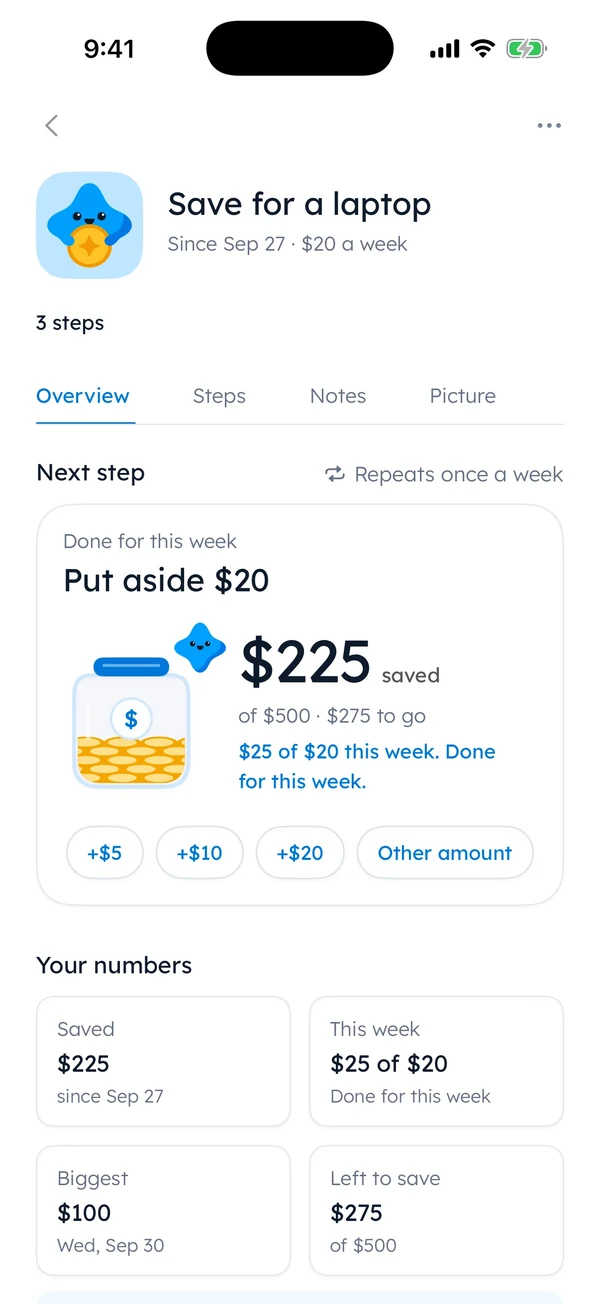
A tracker records what you did. A journal line records how it went.
The app keeps both on one goal with a simple trick: one small thing, then one line. You do the step, then you write a line about it.
When you tap Mark done, Mira cheers and a button says Say how it went. It’s hard to have nothing to say about pages you read five minutes ago.
But paper or phone, the three questions at month end still need you.
Goals, habits and which page you need
A goal has somewhere to get to, like finishing a book or saving for a trip. A habit is something you’d like to keep doing, like making the bed.
This page works for both. For a goal, the running total is the point: 140 pages this month. For a habit, the filled boxes are.
If you’re following three or four small habits, a month grid with a row each fits better. There’s one with these good habits to track, and a habit journal adds a line a day to each.
Start your page tonight
You don’t need the printout to begin. A scrap of paper will do.
Tomorrow, after the step, fill one box.
Then click the cap back on.
Questions people ask
What is a goal tracker?
A goal tracker is a page or an app where you record progress on one goal each day, usually as a number: minutes, pages, money or simply done. You see the days add up, then read the whole month back at the end.
How do I track my goals daily?
Pick one goal and decide how it’s measured. After you do the day’s step, write the real amount in that day’s box. On a busy day, a smaller amount fills the box in full. Keep a running total of the days you showed up.
What should I put in a goal tracker journal?
The goal, how it’s measured, a busy-day amount, one box per day and a few words about how each day went. At month end, add three short answers: which days got filled, what helped, and one change for next month.
Can I track more than one goal at once?
On paper, yes. One page per goal keeps each one easy to read. In Yumemira, the Free plan covers one goal at a time, and Pro adds more goals at once. Starting with one goal still makes for an easier first month.
TopicSmall goals

You earned the Small Step badge
You read the whole guide. Now try the smallest step tonight.
0 XP

Yumemira is an iPhone app (iOS 18 or later).
See the 26 goalsYumemira is free to start. iPhone, iOS 18 or later.