
Small goals
Daily goals checklist: a printable page and a one-tap version

The short answer
A daily goals checklist works best with one goal and five rows: the goal, today’s step, a smaller busy-day step, a tick, and one line about how it went. Fill it in at a time you already stop, like after dinner. Keep it that small for a week.
In 30 seconds
- One goal per sheet keeps the checklist short enough to finish.
- Every goal gets a busy-day step, and the small step still earns the tick.
- Write one line after the tick, about what actually happened.
- A gap gets a line too, then the next box starts fresh.
A list of daily goals can live in a spreadsheet with 40 tabs. Or it can be one sheet on the fridge under a lemon magnet, with a pen on a string that’s two inches too short.
Every tick comes out slanted. The fridge one is still harder to ignore.

Reading XP0 XP
What goes on a daily goals checklist
Five rows, all about one goal: the goal itself, today’s step, a busy-day step, a tick and one line about how it went.
Say you start with a sheet of twelve goals instead. On Monday morning it looks great, every line filled in with neat capitals.
By Thursday it’s a grid of empty boxes, staring back from a door you open eight times a day for milk and leftovers.
So this sheet holds one.
Today’s goal sheet
Ticks stay in this browser. Nothing is sent.
Pick one goal and give it two sizes.
Not sure which goal? Start with the small goals that fit inside an ordinary day, or borrow one from these daily goals examples, which already come with busy-day versions.
The busy-day row is the one that keeps the sheet on the fridge. On a long day, the small step gets the tick. And nobody has to know it was the small one.
How to fill in your daily goals sheet
Write the goal and both steps once. After that it’s about a minute a night: the tick and the line.
| If the row says… | Write… |
|---|---|
| Goal | “Read before bed” |
| Today’s step | “Read 10 pages” |
| Busy-day step | “Read 2 pages” |
| Done | A tick, plus “2” if it was the small one |
| One line | “Read on the bus. Missed my stop by one.” |
The reading sizes above aren’t random. Ten pages fits an ordinary evening. Two pages fits the evening you get home late and eat standing up.
Name the goal plainly.
Use words you’d say out loud. “Read before bed” is easier to keep than “Become a reader”.
Size today’s step.
Something you could finish on a normal day with a little time left over.
Cut a busy-day step.
Make it small enough for your worst ordinary day: 10 pages becomes 2.
Tick, then write.
Tick the box, then write the line right away, while you still remember the bus.
Size the busy-day step for your worst ordinary day.
A filled-in example week
Here’s one week of the reading sheet, filled in the way a lot of real weeks go: some full days, some small ones and one gap.
| Day | Done | One line |
|---|---|---|
| Mon | 10 pages | “Started the library book. Chapter 1 is all weather.” |
| Tue | 10 pages | “Read while the rice cooked. Rice survived.” |
| Wed | 2 pages | “Late dinner. Two pages, then the book slid off the pillow.” |
| Thu | Not done | “Long day. Didn’t open it.” |
| Fri | 2 pages | “Back to it. Two pages before the news.” |
| Sat | 14 pages | “Kept going past 10. The bench was comfortable.” |
| Sun | 10 pages | “Finished chapter 4. Moved the bookmark with some pride.” |
Thursday is the interesting row. The box is empty, but the line still got written.
So the sheet keeps an honest record of the week instead of a tidy one. Wednesday and Friday got two pages and a tick each, and those are the days a twelve-goal sheet would have lost.
That’s the whole trick.
Write the line even when the box stays empty.
If two empty boxes show up in a row, the rule to reach for is never miss twice: the next day gets the busy-day step, whatever else is going on.
The same checklist on your iPhone
On a phone, the sheet becomes one goal with two step sizes, and the tick can happen right from the Lock Screen.
We make an iPhone app built on this same sheet, so we’re not neutral here. But a fridge and a pen on a string work just as well.
In Yumemira, the small-steps journal for iPhone, you pick something you want, like reading. Each ready goal comes as a goal with a busy-day step.
The reading goal starts at 10 pages a day, with 2 pages for busy days.
Tap Start on a step and it shows up as your step on the Lock Screen, with buttons you can tap without opening the app.
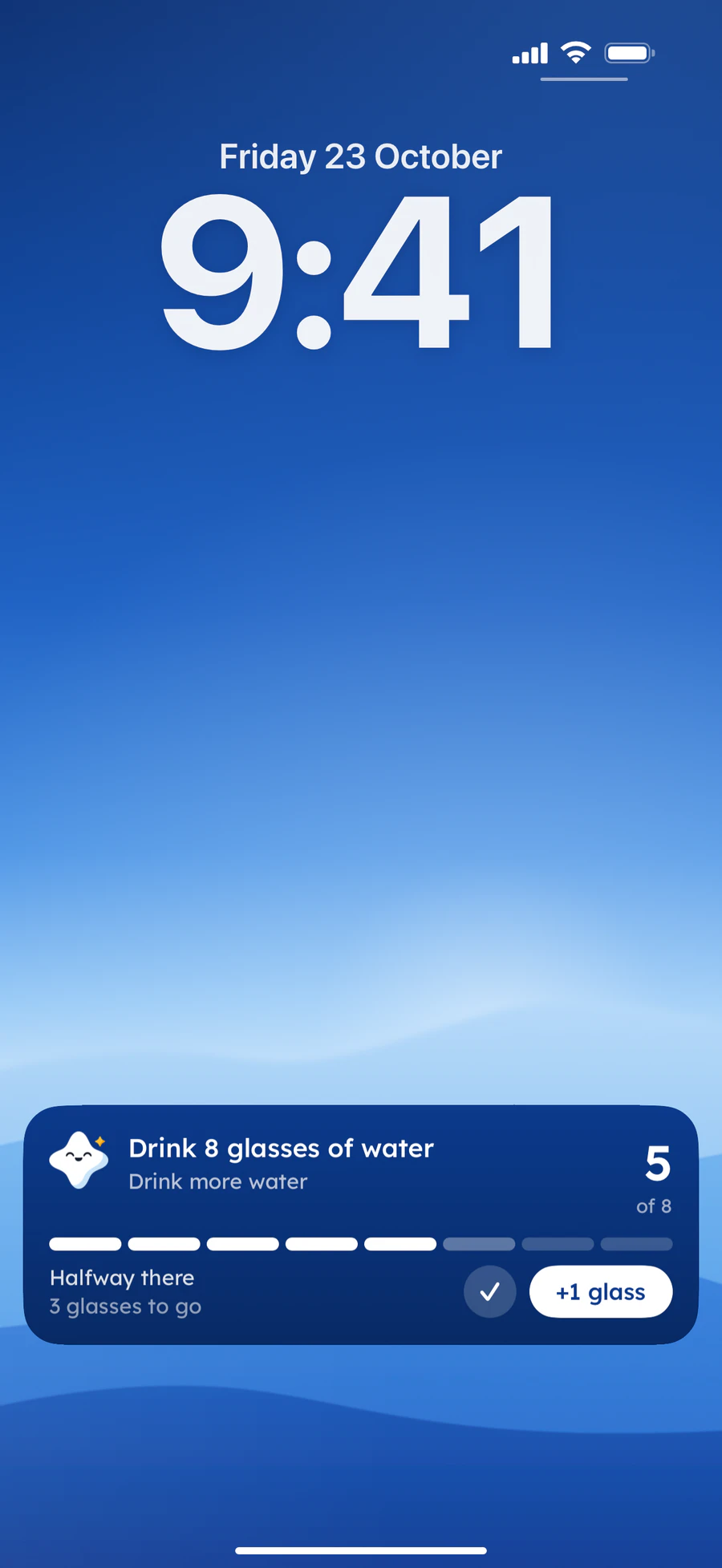
The one-line row comes along too, and on the phone it’s the easy part. It’s hard to have nothing to say about pages you read ten minutes ago.
But the line waits until you’ve done the step. When you mark it done in the app, Mira cheers and a button says Say how it went.
If you’d rather keep the lines on paper for longer than a week, a goal journal holds a whole month of them on one page.
Make your sheet tonight
Writing the sheet takes about two minutes. And the first tick can wait until tomorrow.
Tomorrow it’s one box and one line. The lemon magnet is optional.
A slanted tick looks just as good on a fridge door.
Questions people ask
What should be on a daily goals checklist?
One goal, today’s step, a smaller busy-day step, a box to tick and a line about how it went. One goal keeps the sheet quick to fill in, even at the end of a long day.
How do I make a daily goals sheet?
Any sheet of paper works. It needs five rows: goal, today’s step, busy-day step, done and one line. Fill in the first three once, then tick and write the line each night. Keep it somewhere you stop every day.
Is there an app for a daily goals checklist?
Yes. Yumemira, the small-steps journal for iPhone, gives a goal a daily step and a busy-day step, a tick on the Lock Screen and a one-line journal. Free covers one goal at a time; more goals at once need Pro.
How many daily goals should I have?
One is a good start. Add a second only after the first has felt easy for a couple of weeks. More goals mean more boxes, and a sheet full of empty boxes is easy to stop looking at.
TopicSmall goals
You earned the Small Step badge
You read the whole guide. Now try the smallest step tonight.
0 XP

Yumemira is an iPhone app (iOS 18 or later).
How Yumemira worksYumemira is free to start. iPhone, iOS 18 or later.