
Habit journal
Habit journal page: track a habit and note how it went

The short answer
A habit journal is one page that holds a habit and a note about it: a box to tick each day, and one short line beside it saying how it went. Pick one habit and fill in both right after it happens, like on the bus home or while you brush your teeth. Give it a week before adding more.
In 30 seconds
- Put the tick and the line on the same page.
- Track one habit per page. Add a second page later.
- Write what made today easy or hard, in one line.
- A skipped day gets a line too, with no catching up.
Two notebooks share a drawer. One holds a habit grid with 9 ticks and 22 empty boxes. The other holds four journal entries, all from the same week.
Neither one says why the ticks stopped. But one page can hold both, so the reason lands right next to the box.

Reading XP0 XP
What a habit journal page is
It’s a habit tracker and a journal sharing one page: one habit and 31 boxes on the left, one line a day on the right.
The tick says you did it. The line says how, and that’s the part you’ll use next week.
Say the habit is reading before bed. The grid shows 11 ticks in a row, then a gap that runs all the way to the end of the month, and stares back at you.
So what do the lines add?
This is one of the plainer answers to how to stay consistent: you notice what got in the way while you still remember it.
Keep the tick and the line on the same page.
How to set up a habit tracker journal page
It takes a notebook and a pen, plus about five minutes. A ruler helps (the edge of a library card works too).
One habit, two sizes.
Write it at the top with a daily size, like “Read 10 pages”. Under it, add a busy-day size: “or 2 pages”.
31 numbered rows.
One row per day, down the left edge. February gets two or three spare rows and no explanation.
A tick column.
A narrow box beside each number. Tick it, or leave it empty if you didn’t.
One line per day.
The wide right side is the journal, and a single line fills it.
A month note.
Three or four lines at the bottom on the last day: what helped, and what didn’t.
That’s the whole spread. Here’s the first week of one, written out so you can copy the layout.
| Day | Done | One line |
|---|---|---|
| 1 | Yes | “10 pages on the bus. Easy.” |
| 2 | Yes | “Read in bed. Phone stayed on the charger.” |
| 3 | Yes | “Only 2 pages, but the book was open.” |
| 4 | No | “Late shift. Book was in the other bag.” |
| 5 | Yes | “Put the book on my pillow. Worked.” |
| 6 | Yes | “15 pages. Couldn’t stop at 10.” |
| 7 | Rest | “Rest day.” |
Now read days 4 and 5 together. The note on the missed day turned into the fix for the next one.
Would you rather run the boxes across the top in a long row? That works.
But a column down the side leaves more room for words.
What to write next to the tick, with examples
The line is the useful half, and five words will do.
It helps most when it’s about what made it easy or hard. Those are things you can change tomorrow, like where the book sits or when the shift ends.
| If today was… | Write something like… |
|---|---|
| Done easily | “Read on the bus. Window seat helped.” |
| Done, but late | “11 pm. Dinner ran long, then dishes.” |
| Skipped | “Tomorrow: book goes on the pillow.” |
| Done in the busy-day size | “2 pages only. Still a tick.” |
| A rest day | “Rest day.” |
On a bad day, the line can be two words. “Hard day.” is a true line, and it fills the row.
Write the line within a minute of the tick.
A habit journal app version on your iPhone
A notebook’s enough for all of this. We make an iPhone app built around the same loop, so we’re not neutral here.
A line comes easier when it’s about something you did minutes ago. So the app starts with the doing.
In Yumemira, the small-steps journal for iPhone, you pick one of 26 ready goals or make your own. Each day shows one step, like 10 pages, with a busy-day size under it.
When it’s finished, you tap Mark done and Mira, the app’s star, says “Nice. That counts.”
Then Say how it went asks “How did it go?” Your line goes into a one-line journal beside your goal, with a face for how it felt.
| Spread part | Paper | Phone |
|---|---|---|
| Habit name | Top of the page | Pick a ready goal |
| Daily tick | A box per day | Mark done |
| Note | One line | One line after Say how it went |
| How it felt | Draw a face | Pick one of five faces |
| Month view | Flip back a page | Month calendar in Journal |
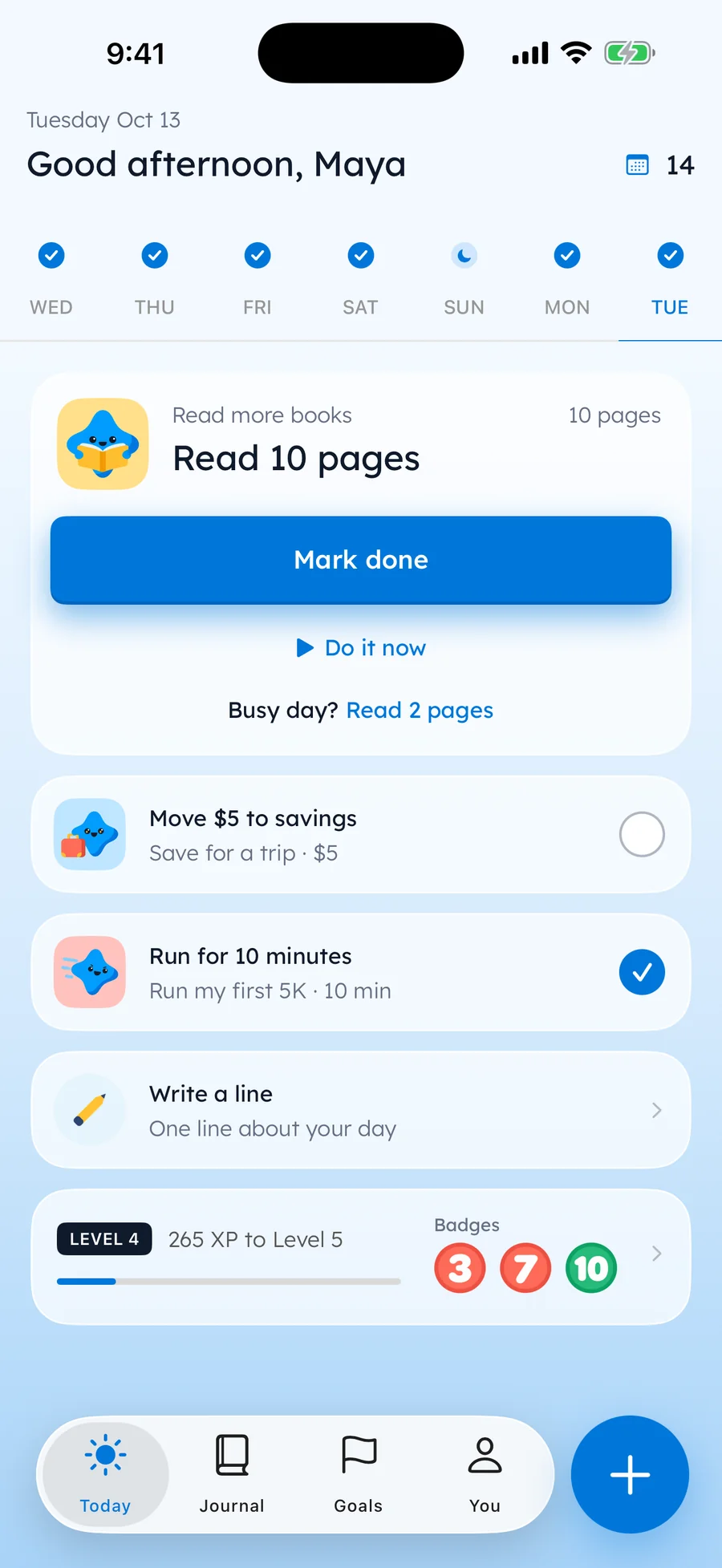
In the Journal tab, a line written after a step carries a small Step done label. So the tick and the line stay together, the way they do on paper.
Paper or phone, the page does the same job. As far as we can tell, the right one is whichever is in reach when the habit ends.
Keep the page where the habit happens.
Habits worth a page
A habit earns its own page when it happens most days and fits in one line. These sizes are the app’s own defaults, and they work on paper too.
- Reading: 10 pages a day, 2 on a busy day
- Walking: 20 minutes, 5 on a busy day
- Water: 8 glasses, 4 on a busy day
- Going outside: 20 minutes, 5 on a busy day
- Gratitude: 3 good things, 1 on a busy day
So where does writing one line fit? It’s a habit all on its own, and the right side of the page already holds it.
There’s a longer list of habits to track, each with its own size.
Some things aren’t habits at all, like a first 5K or a trip.
A goal journal gives them the same kind of page, with a step where the tick was.
The other notebook can stay in the drawer. This page does both jobs.
Questions people ask
What is a habit journal?
It’s a notebook page, or a phone screen, where you track one habit with a tick each day and write one short line beside it about how it went. The line explains the ticks.
How do I make a habit tracker journal?
Write one habit and its daily size at the top of a page. Number 31 rows, add a narrow tick column, and leave the wide side for one line a day. Save the bottom for a short month note.
What should I write in a habit journal?
The most useful line says what made today’s habit easy or hard: where you did it, what got in the way, or what would help tomorrow. Five words will do. On a rest day, “Rest day.” does the job.
Can I combine a journal and a habit tracker?
Yes, and one page is enough for both: ticks down one side, one line a day beside them. Then a missed box comes with its reason, and there’s only one notebook to keep.
TopicStaying consistent

You earned the Page Keeper badge
You read the whole page. Now rule one row and tick today.
0 XP

Yumemira is an iPhone app (iOS 18 or later).
How Yumemira worksYumemira is free to start. iPhone, iOS 18 or later.