
Voice journaling
Voice journaling: what to look for in a voice journal app
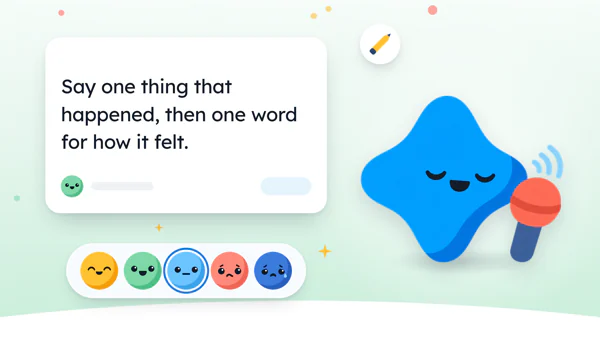
The short answer
A good voice journal app keeps your recording with the entry, turns speech into words you can search and fix, and tells you plainly where both are stored. To start, say one sentence about today at a time you already stop, like plugging in your phone. Keep it that small for a week.
In 30 seconds
- Say one thing that happened, then one word for how it felt.
- The phone you already have can do this for free.
- Before an app gets your voice, check where the audio and words go.
When did you last talk to yourself out loud? In the car, probably, at a red light, explaining to nobody why the other lane always moves faster.
That’s voice journaling, minus the record button.
We built an iPhone app with a microphone in it, so we’re biased. A pen works just as well.

Reading XP0 XP
How to voice journal in about a minute
Voice journaling is one short recording a day about something that happened, plus a word for how it felt.
It’s the spoken cousin of micro journaling, with the same rule: small enough to do half asleep. Talking is quicker than typing for a lot of us, and it skips the handwriting you can’t read the next morning.
Pick a moment you already stop.
Plugging in your phone, parking the car, taking your shoes off. The recording comes right after.
Say one thing that happened.
One plain sentence, the way you’d tell a friend on the phone.
Add one word for the feeling.
Great, okay, so-so, worried or hard. One word does the job.
Stop there.
Even if you feel like you said nothing important.
Stop after one sentence, even on a chatty night.
A three-minute ramble feels great on Monday, fine on Tuesday, and by Thursday it’s a speech you owe somebody before you’re allowed to go to bed. Keep it short.
If you like a timer, the same idea works as a sixty-second journal, out loud instead of on paper.
What to say when you press record
The blank page has a spoken version. You press record, and suddenly your own voice sounds like a radio host with nothing to announce.
So have a line ready.
| If today was… | Say something like… |
|---|---|
| Completely ordinary | “Nothing new. The soup was good, though.” |
| Too full for one line | “One moment: the quiet walk back from the bus stop.” |
| Spent mostly in the car | “Forty minutes in traffic. Finished the whole podcast.” |
| A small win | “Fixed the wobbly chair. It’s still a bit wobbly.” |
| Hard | “Hard day.” |
One sentence out loud is a complete entry. Anything more is a bonus, not homework.
The free way, with the phone you already have
You don’t need a special app to start. And your phone already has two tools for this.
- The voice recorder that came with your phone keeps the sound itself.
- The microphone key on your keyboard turns speech into text in any notes app.
On an iPhone, Apple says dictation is processed on your iPhone in many languages, with no internet needed (opens in a new tab). The same page adds one exception: words dictated into a search field may go to the search engine.
So a free voice journal can be one note called “Days”, with one dictated line under each date.
Paper people can do it too. Say the line out loud, then write down what you said.
If the free way sticks for a month, wonderful. If it doesn’t, the checklist below helps you pick an app without guessing, and there’s more in how to journal on your iPhone.
What to look for in a voice journal app
A voice journal holds two things: the sound and the words. Every useful question about an app comes back to those two, and where they end up.
Here are six checks, with Yumemira’s answer to each. The limits are in there too, since a table of only our good points wouldn’t help you choose.
| Check | Why it matters | How Yumemira does it |
|---|---|---|
| Where the audio is stored | Your voice is personal, and it’s a file somewhere | On your iPhone, with the entry. Not uploaded to us |
| Where speech becomes text | Some apps send audio away to be transcribed | On the iPhone. In an unsupported language, you type instead |
| Do you need an account | An account means your entries live on someone’s server | No account to make |
| Can you search the words | You’ll want to find “the chair” next March | Search covers what you said. A Voice notes filter shows recordings |
| Can you fix misheard words | Speech-to-text gets names wrong | Tap any word to fix it |
| Can you get it all out | Phones get lost, and some fall in the sink | Settings › Backup saves a file you keep |
The second row is the one to slow down for. It’s easy to miss, and an app’s store page doesn’t always say.
Check where the audio goes before you compare features.
Where your words get turned into text
Apple lets apps use its speech recognition, and its privacy page explains what can happen to the audio.
“the audio data to be transcribed may be sent to Apple.”
That applies when you let an app use Speech Recognition for transcription.
Apple’s developer documentation also gives apps a setting that keeps the audio on the device (opens in a new tab). The same page says on-device requests won’t be as accurate.
So the fair question for any app is simple: does the audio leave the phone to become text? A good app answers that in its privacy policy, in plain words.
Searchable beats clever
A recording you can’t search is a shoebox of cassettes. You know the good one is in there somewhere.
Words you can search are different. Type “chair” a year from now and the wobbly-chair evening comes back, with the sound still attached in case you want to hear yourself being annoyed at furniture.
Clever extras are fun for about a week. So check the boring things first: search, fixing words, and backup.
They’re what you’ll use on a random evening in March.
How voice works in Yumemira
Our app is built around one small step a day, and voice fits right after the step.
The bridge is short: do one small thing, then say a line about it. It’s hard to have nothing to say about something you did four minutes ago, even if the thing was ten push-ups and a lot of complaining.
So in Yumemira, the small-steps journal for iPhone, you mark your step done and tap Say how it went. The entry opens with Mira’s question at the top and a microphone in the row of buttons.
Tap the microphone.
The screen says “Listening. Your words show up as you talk.”
Say your line.
Then tap to stop.
Fix what it misheard.
A small line reads “Tap any word to fix it.”
The recording stays with the entry, next to its face.
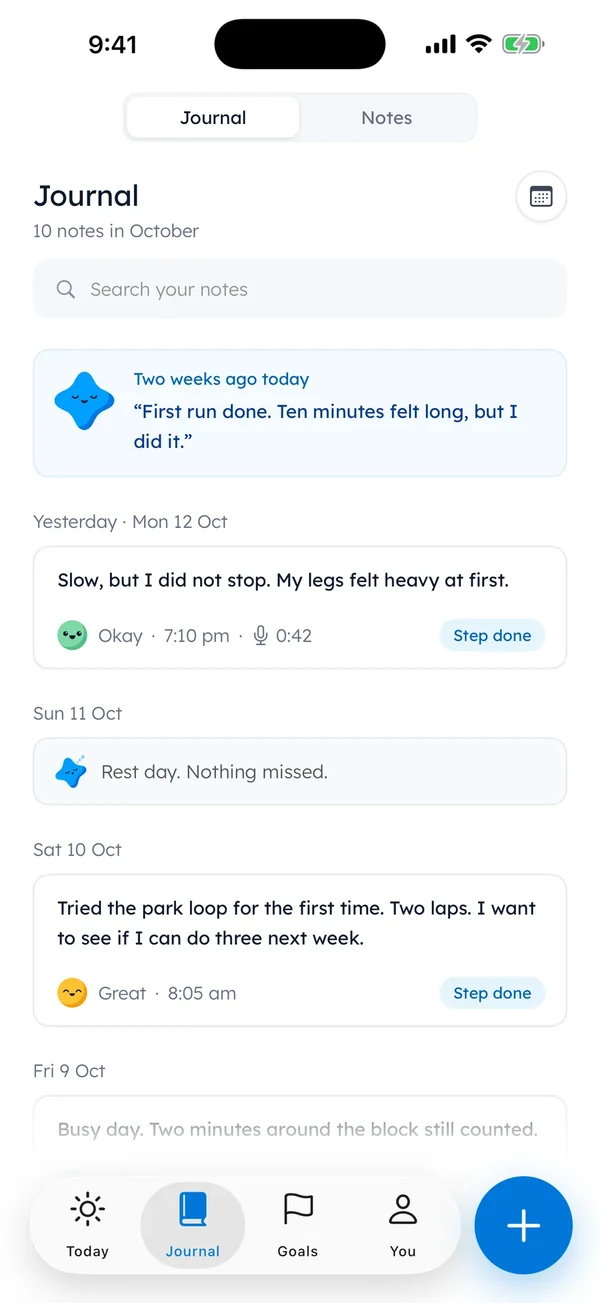
Voice and search are part of the free app. It’s iPhone only, and each iPhone keeps its own journal. So the backup file in Settings is worth making now and then.
There’s more on the journal page, and the rest of the app is on the iPhone app page.
Some nights even a sentence is too much. Journaling for people who hate writing has seven ways that skip most of the words.
Tonight’s one recording
Tonight, before you plug in your phone, press record and say one sentence about today.
It can be about soup. It can be “Hard day.” Then stop, even if it took eleven seconds.
The car can keep the long speeches about the other lane.
Questions people ask
What is voice journaling?
Voice journaling means keeping a journal by talking instead of writing. You record a short entry about your day, usually a minute or less. Some apps keep only the sound, some turn it into text, and some keep both together.
Can I voice journal on iPhone without an app?
Yes. Use the voice recorder that came with your iPhone, or tap the microphone key on the keyboard to dictate one line into a note each night. Both are free and already on the phone.
Are voice journal apps private?
It depends on the app. Check three things: where the audio is stored, whether speech is turned into text on the phone or sent away, and whether you need an account. A good app answers all three in its privacy policy.
How long should a voice journal entry be?
As short as you like. One sentence about something that happened, plus a word for how it felt, does the job. Short entries are easier to keep doing on busy nights.
Is a voice journal better than writing?
Neither is better for everyone. Talking is quicker for some people and skips handwriting, while writing is quieter and easier to skim later. Many apps keep both: the sound, and the words you can read and search.
Sources
TopicOne line a day
You earned the Good Picker badge
You read the whole checklist. Tonight, say one sentence about today out loud.
0 XP

Yumemira is an iPhone app (iOS 18 or later).
More about the daily journalYumemira is free to start. iPhone, iOS 18 or later.