
One line a day
The 60-second journal: how to journal when you have no time

The short answer
To journal when you have no time, shrink the entry to the seconds you have: one word and a face in 10 seconds, one fact and a feeling in 30, a short line in 60. Write it at a time you already stop, like waiting for the microwave. Keep it that small for a week.
In 30 seconds
- Pick the format by the seconds you have, not the mood you’re in.
- Write while you wait for something that takes a minute anyway.
- On the fullest days, one word and a face will do.
- A missed day needs no catching up. Tonight’s line is the only one due.
“Journaling for busy people” is a real Google suggestion (US, 2 Oct 2026).
Presumably the busy people didn’t have time to type the rest.
A journal can be very short and still be a journal. That’s the idea behind micro journaling, and we make an iPhone app built on short lines, so we’re not neutral. A pen works too.

Reading XP0 XP
How to journal when you have no time
Don’t wait for a free half hour. Find the next wait instead, and give it one line.
A full day hides a lot of small waits:
- the microwave counting down
- the bus that’s four minutes away
- the laptop restarting for an update nobody asked for
- the lift that stops at every floor
Each one lasts about a minute. You were going to stand there anyway.
This is the waiting line. You write while something else finishes, so the journal never needs a time slot of its own.
Match the entry to the seconds you have.
| Seconds you have | The format | A line it might get |
|---|---|---|
| 10 | One word and a face | “Meetings. So-so.” |
| 30 | One fact and one feeling | “Missed the 8:10 bus. Fine by lunch.” |
| 60 | One short line, plus a word for tomorrow | “Fixed the tap with a butter knife. Tomorrow: landlord.” |
| 180 or more | Keep going until the time runs out | “The talk with my manager went better than in my head.” |
The sizes are a menu. You’re allowed to order the small one every day.
How long an entry should be is a different question, and the right journal entry length depends on why you keep one. This page is only about the clock.
The 10-second journal
Write one word for the day and a face for how it felt. That’s it.
Ten seconds is less time than it takes to find your glasses. It’s still enough for “Rain. Okay.” or “Dentist. Worried.”
The word can be a place or a meal. The face does the rest: great, okay, so-so, worried or hard.
On paper, a tiny drawn face next to the date does the job. A pocket calendar works too, one square per day.
But what do you write when the day was a blur? Something you did.
So the ten seconds get easier when you do one small thing first, like drinking a glass of water or reading two pages, then write about it.
Yumemira, the small-steps journal for iPhone, is built around that order. When you start a step, it stays on your Lock Screen, and the round tick marks it done without opening the app.
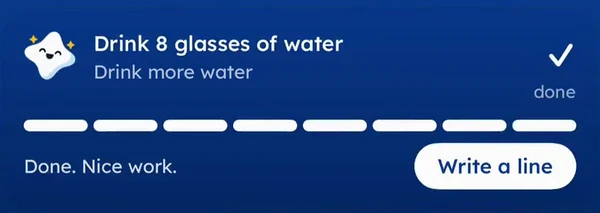
Then the card says “Done. Nice work.” and shows a Write a line button, while the step is still fresh.
It’s hard to have nothing to say about something you finished thirty seconds ago.
On paper the order is the same, minus the Lock Screen. One small thing, then a word and a face in the notebook.
The 30-second journal
Thirty seconds fits one fact and one feeling. The fact is what happened, and the feeling is a word for how it went.
- “Packed two lunchboxes before seven. Tired but done.”
- “Answered a work email at 9 pm. Annoyed.”
- “Bath time took an hour. Okay, mostly.”
- “The charger cable only works at one angle now. Funny, then less funny.”
The fact keeps the day easy to find later. And the feeling keeps it honest.
If your hands are busy, say the line instead of typing it. On iPhone, you can tap the microphone button on the keyboard (opens in a new tab) and talk, wherever you can type.
Say it out loud when your hands are full.
A spoken line is still a line. If talking is your easiest way in, a voice journal app might suit you better than a pen.
The 60-second journal
A full minute fits one short line and a word for tomorrow. It’s the most a busy day ever needs.
Write the date.
The weekday is fine. “Wed” will do.
Write what happened.
One sentence, plain words, the way you’d tell a friend.
Add a feeling word.
Great, okay, so-so, worried or hard.
Add one word for tomorrow.
“Landlord.” “Groceries.” “Rest.” Then stop.
The last step is optional. But it’s handy, since tomorrow’s line has somewhere to start.
Stopping matters more than it looks. Say a good night stretches the minute to ten, with a second cup of tea and a page about the neighbour’s new fence, and it feels great.
Then the next busy night remembers the ten-minute version and skips.
Stop when the minute ends, even on good nights.
Where to find a minute in a busy day
Busy days are full of waits you don’t notice, and a journal minute fits inside any of them.
| While you wait for… | A line it might get |
|---|---|
| The microwave to beep | “Leftover rice again. Better on day two.” |
| The bus or train | “The 6:40 came on time for once.” |
| The bath to fill | “Two baths, one flooded floor. Okay.” |
| A laptop update | “Lost a morning to updates. So-so.” |
| The pressure cooker or the oven | “Dal on. Day nearly over. Great.” |
Pick one wait that happens every day and keep it for a week. A daily wait works like an alarm you never have to set.
So where does the line live during that wait? Somewhere you already look. A journal widget on your iPhone keeps the step on the Home Screen or Lock Screen.
On paper, keep a small notebook and a pen by the microwave. Nobody borrows a pen from the kitchen.
When you have more than a minute
Some days give you a quiet hour, and you can keep going. Write the short line first, then let it run.
But the short format stays the default. The long night is a bonus, and the short line is what keeps a journal out of the drawer in a hard month.
If one line a day is the size you keep coming back to, the one line a day journal is that habit with a year of lines in it. You can keep it in either place:
- on paper, in any notebook with a pen inside it
- in a journal on your iPhone, like Yumemira, with the step on your Lock Screen
Tonight, during the next thing you wait for, write one word and a face.
It’s quicker than typing that search was.
Questions people ask
How do I journal if I’m busy?
Make the entry fit the time you have: one word and a face in 10 seconds, one fact and a feeling in 30, one short line in 60. Write it during a wait you already have every day, like the microwave or the bus.
Can you journal in one minute?
Yes. In a minute you can write the date, one sentence about what happened, a feeling word and one word for tomorrow. A 60-second timer helps you start, and it tells you when to stop.
Are short journal entries still worth writing?
Yes, if you want a record you can keep up. A month of one-line entries shows what happened and how each day felt. You can always write more on a quiet day, then go back to short.
What are some quick journaling techniques?
Try the one-word rule (one word and a face), the one-minute timer, writing while you wait for something else, and saying the line out loud with dictation when your hands are full.
What’s the best time to journal when you’re busy?
A wait that happens every day anyway, such as the microwave, the bus or a laptop update. Tie the line to that moment, so you never have to find a new slot in the day.
Sources
TopicOne line a day

You earned the Small Step badge
You read the whole guide. Now give tonight’s line the next minute you spend waiting.
0 XP

Yumemira is an iPhone app (iOS 18 or later).
Yumemira on iPhone: Lock Screen and widgetsYumemira is free to start. iPhone, iOS 18 or later.