
Goal apps
Goal setting app: what to look for if you want one place
The short answer
A good goal setting app asks for one small step a day, offers a smaller step for busy days, and doesn’t wipe your progress when you skip one. It keeps your notes private and tells you what’s free. Pick one goal, do its step at a time you already stop, and keep it that small for a week.
In 30 seconds
- Ask what the app wants from you today.
- Look for a daily step, plus a smaller one for busy days.
- Skipped days shouldn’t erase the days you showed up.
- Reminders should stay off until you switch them on.
- Before paying, check what stays free and how to cancel.
Say your last goal app had 14 goals, six colors and a dashboard. You opened it twice.
The dashboard looked great both times.
So this time, ask every app one plain question: what do you want from me today?
We make one of these apps, so we’re not neutral here. A notebook passes this test too.

Reading XP0 XP
What should a goal setting app actually do?
Strip away the colors and the charts, and a goal setting app has three jobs.
Turn a goal into today’s step.
“Read more” is a wish. “Read 10 pages” is something you can finish before bed.
Show up where you already look.
The Lock Screen, a widget, one tap away.
Let you start again.
After a missed week, the app should open on today, without a red zero waiting for you.
If it can’t say what to do today, keep looking.
A goal like “get fit” sounds great on New Year’s Day. But on a Thursday evening, with dinner still in the pan and the laundry still in the machine, it gives you nothing to do.
A step does.
Here’s what that looks like in real numbers. These are the starting steps in our app for four of its ready goals, so you can see the size we mean.
| Goal | A step for today | Busy-day step |
|---|---|---|
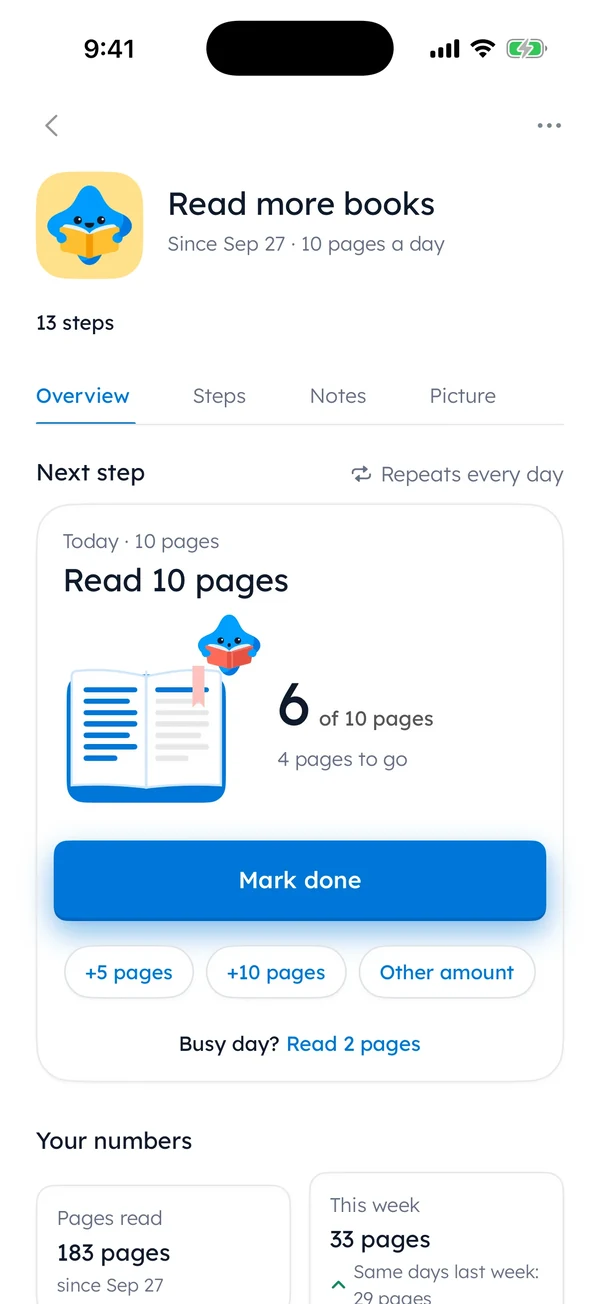
| Read | 10 pages | “Read 2 pages” |
| Walk | 20 minutes | “Walk for 5 minutes” |
| Drink water | 8 glasses | “Drink 4 glasses of water” |
| Stretch or yoga | 10 minutes | “Stretch for 2 minutes” |
Look at the right column. Two pages won’t finish a book by Friday.
But they keep the book open, and an open book is much easier to pick up tomorrow.
If the phone ends up as your tool, journaling on your iPhone covers the writing side of the same idea.
The goal app checklist, with our answers
Hold any app against these nine checks, or a notebook. We answered for ours, including the two rows where the answer is no.
| Check | Why it matters | Yumemira’s answer |
|---|---|---|
| A daily step, not just a goal | Today needs a size | Yes, a step small enough for today |
| A busy-day version | Bad days happen | Yes, and it counts in full |
| Skipped days don’t wipe progress | Missed days make restarting harder | Days shown up never go down |
| Reminders you control | Nagging gets muted | Off until you turn them on |
| On your Lock Screen | Fewer taps | Yes, and in the Dynamic Island if your iPhone has one |
| A place to write how it went | Notes keep you honest | One line and a face |
| Private, no account | It’s your life | On your iPhone, no account |
| More than one goal free | Some people juggle | No, Free is one goal at a time |
| Works on other devices | Phones change | No, iPhone only |
If you need three goals going at once without paying, or your goals have to follow you from phone to laptop, pick a different app.
That’s a fair reason. Other apps are built for it.
If one goal and one step a day is all you want, most of our answers are yes.
In Yumemira, the small-steps goal journal for iPhone, the Today screen shows one step and a smaller one under it, like a 2-minute run. Tap Mark done, and Mira, the app’s star, cheers.
The busy-day step fills the day the same way the full step does. A tired evening still goes in the record.
What should you check before paying for a goal app?
A goal app can be free to start and still have a paid plan on top. What matters is what stays free after the trial ends.
Before you tap Subscribe
Ticks stay in this browser. Nothing is sent.
On an iPhone, the last one has the same answer for every app.
App Store subscriptions are cancelled in Settings: tap your name, then Subscriptions (Apple’s steps (opens in a new tab)). Find the cancel button before you need it.
For ours, the daily step stays free either way. Rest days aren’t for sale in Free or in Pro.
The full list of what Free and Pro include sits on our home page, with the price, so it isn’t hiding in a pop-up.
Goal tracker app or a paper tracker?
To be fair to paper, it does a few things better than any app.
- It never needs charging.
- It shows the whole month on one page.
- It’s never once sent a notification at the wrong moment.
But a paper tracker also never reminds you it exists.
That’s usually how it ends up under last month’s magazines on the kitchen table, with nine neat ticks at the top of the page and then nothing at all.
| Paper tracker | Goal app | |
|---|---|---|
| Always with you | Only if you carry it | In your pocket |
| Adds up for you | You add it up | Pages, glasses and minutes add up |
| A smaller step for bad days | Write one in yourself | Built in, if the app has one |
| Needs charging | No | Yes |
| Costs | A pen and a page | Free to start, check the paid plan |
If paper suits you, a printable goal tracker works on the same idea: one goal and a small step, ticked each day. Size the step the way the first table does.
If the phone suits you, the test is simple. Set up one goal and use it for a week before you add anything else.
If you’d like that goal on your Lock Screen while you test it,  try it in Yumemira.
What if you have too many goals for one app?
Fourteen goals in one app can mean fourteen small guilty feelings every time you open it. So start with one.
Picking takes a minute.
Two questions help with how to prioritize goals: which one would you be gladdest to see moving by the end of the month? And which has a step you could do tonight?
Once you’ve picked, make the step smaller than feels serious.
Ten pages. One glass of water with lunch.
Yumemira has 26 ready goals, from water and reading to saving, or you can make your own. Each one measures in its own units. So reading measures in pages.
Can a goal app also be your journal?
It can, if writing stays small. One line after the step is enough.
In our app, after you mark a step done, a button says Say how it went. It asks “How did it go?”, and you write one line and pick a face, from Great to Hard.
- “Read 10 pages on the bus. Nearly missed my stop.”
- “Walked 5 minutes. Rain, but I went.”
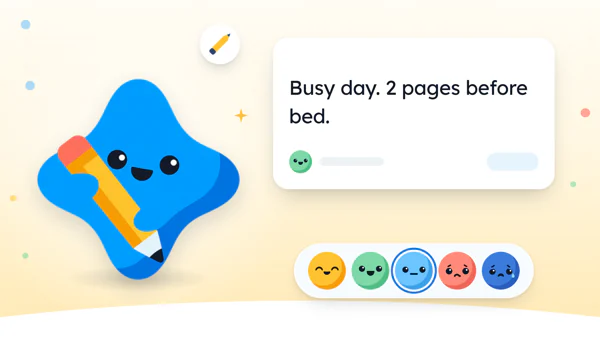
- “Busy day. 2 pages before bed.”
Write the line while the step is still fresh.
Little by little, those lines become a record of what you actually did on ordinary weekdays, written in your own words while you still remembered the details. A dashboard can’t give you that.
On paper, it’s a line in the margin beside the tick.
And in our app, rest days, pausing a goal and mending a missed day now and then are built in, at no extra cost.
Tonight, before you plug in your phone, open your notes and write one goal with one step small enough for tomorrow.
No dashboard. Just a step you could finish half asleep.
Questions people ask
What is the best app for setting goals?
The best one is the app you’ll still open on a bad day. Check that it gives you a small daily step, a smaller step for busy days, reminders you control and a clear answer on what stays free. Then try it with one goal for a week.
Is there a free goal setting app?
Yes. Many goal apps are free to start, including Yumemira, which is free with one goal at a time. Before you subscribe to any app, check which features stay free and how to cancel in your Apple subscriptions.
Can a goal app also be a journal?
Yes, if the writing stays short. The easiest version is one line after each step, plus a word or a face for how it went. A line written right after doing something comes easier than a long entry written hours later.
Should I use a goal app or a notebook?
Use whichever you’ll actually reach every day. A notebook needs no charging and shows the whole month at once. An app sits in your pocket, adds up your steps and can put today’s step on your Lock Screen.
What makes a good goal tracker app?
A good goal tracker app turns one goal into a small step for today, has a busy-day version, keeps your past days when you skip one, and lets you choose when reminders arrive. Privacy and a clear free plan matter too.
Sources
TopicJournal apps
You earned the Good Picker badge
You read the checklist. Now give one goal a step for tomorrow.
0 XP

Yumemira is an iPhone app (iOS 18 or later).
How Yumemira worksYumemira is free to start. iPhone, iOS 18 or later.