
Journal apps, compared
Apple Journal or a Goal Journal? When Each One Makes Sense

The short answer
Apple Journal is the free journal app built into your iPhone, made for longer entries, photos and moments your phone suggests. A small-steps goal journal fits better if you’d rather have one goal and one step a day, with a line about it. You can use both. Try one at a time you already stop, for a week.
In 30 seconds
- Apple’s journal is free, built in, and good at long entries with photos.
- It suggests moments from your day and locks with Face ID.
- A goal journal starts with a small step, then asks for one line.
- Yumemira is iPhone only, and your journal stays on that phone.
- Using both is fine: long entries there, the daily step here.
The journal that came with your iPhone is free and good at its job. Yours has two entries from January.
The second one is about a sandwich. (A good sandwich, to be fair.) We make a different kind of journal, so we’re not neutral here, but we’ll say where Apple’s app is the better pick.

Reading XP0 XP
What is the Journal app on iPhone?
Journal is Apple’s own journaling app. It arrived with iOS 17.2 in December 2023, according to Apple’s launch announcement (opens in a new tab).
It costs nothing.
An entry can hold words, photos, video, audio and places, and the app can show moments from your day to write about.
What it does now
It does more today than the first version did. Apple’s guide to writing in your journal (opens in a new tab) now covers more than one journal per person.
There’s also a calendar for finding an old entry, handy for that Thursday in March when something happened and you wrote it down but can’t remember a single detail.
Odd how often that happens.
Newer iPhones with Apple Intelligence also get writing prompts based on what you’ve typed so far. For every way to write on a phone, start with how to journal on your iPhone.
What Apple Journal does well
Let’s be fair first. It does a lot.
- Long, rich entries. Text, photos, video, audio recordings and drawings, all in one entry.
- Ideas from your day: Journaling Suggestions turn recent photos, places, workouts and songs into moments.
- A lock: Face ID or your passcode keeps the journal to you.
- More screens: with Journal turned on in iCloud, entries also show up on your iPad and Mac.
- A reminder: a writing schedule, plus a widget for the Lock Screen.
Apple’s page on building a habit with Journal (opens in a new tab) covers the schedule and the widget. It also shows an Insights view that tracks the days you write.
The suggestions are made on your phone. Apple’s Journaling Suggestions privacy page (opens in a new tab) says you choose which kinds of data feed them, and which moments go into an entry.
For long entries with photos, the built-in app is enough.
If that’s what you’re after, feel free to stop reading here, with our blessing. The suggestions get their own guide: what Journaling Suggestions on iPhone are.
Why people stop opening it
Some people keep a built-in journal for years. Others drift away by February.
Both are normal, and we haven’t measured why. These are guesses, so check them against your own January.
- The page asks for a lot. A big, empty entry with room for photos can feel like homework on a tired night.
- Nothing happened today. Suggestions need a photo or a walk, and some days have neither, just laundry on a chair.
- No reason beyond writing. If writing about the day isn’t what you want, nothing else pulls you back.
The third one is probably the big one, because a journal that only asks about the day has nothing to offer on a day that offered nothing.
And it’s where a goal journal works differently.
A blank page needs something to write about first.
Apple Journal vs a small-steps goal journal
The difference is what comes first. Apple’s app starts with your day and asks you to write about it.
A goal journal starts with one thing you want and a step small enough for today. The line comes after.
Different jobs, then.
| What you want | Apple Journal | Yumemira |
|---|---|---|
| Long entries with photos and audio | Yes, made for it | One line is the default |
| Ideas pulled from your day | Yes, Journaling Suggestions | No; Mira asks one question |
| A goal with a step each day | No; Insights track days you write | Yes, one small step a day |
| Something on your Lock Screen | A widget with prompts | Your step, as a Live Activity |
| Lock with Face ID | Yes, free | Yes, with Pro |
| Price | Free, built in | Free to start, Pro is optional |
| Where it lives | iPhone, iPad and Mac with iCloud | iPhone only; stays on your phone |
In a goal journal, the day’s job is already decided. Do the small step and tap Mark done. Then tap Say how it went and write one line while it’s fresh.
That decided step is the whole difference.
A blank page waits for something to say. A task hands you one, which helps on a night when your brain has already gone to bed and only your thumbs are still awake.
But the trade-off is real. Yumemira won’t hold holiday photos in a long entry, and it won’t follow anyone to a Mac. If that matters more, Apple’s app is the better fit.
Can you use both journals together?
Yes, and it’s a sensible split. Let each app do the one job it’s good at.
Keep long entries in Apple’s app, for trips and the days you want in detail. Keep the daily step in a goal journal, where one line will do.
| Kind of day | In Apple’s app | In Yumemira |
|---|---|---|
| A day out, with photos | “Market, rain, and the umbrella that didn’t open.” | “Read 10 pages on the train. Good chapter.” |
| A busy weekday | Nothing tonight, and that’s fine | “Busy day. Did the 2-minute run anyway.” |
| A slow Sunday | “Half a page about changing jobs.” | “Drank all 8 glasses. Mostly before lunch.” |
| A hard day | Nothing, or one sentence | “Hard day. Did the short step.” |
Here’s what we don’t do. Yumemira is iPhone only.
The journal stays on that one iPhone and doesn’t show up on other devices. So use Settings › Backup to save a file you keep, somewhere that isn’t the same phone. And Free gives you one goal at a time.
Still deciding between a notebook and a phone? Paper vs digital journal compares them by the reasons people stop.
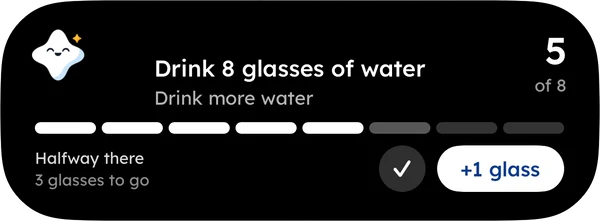
The trick works in any app, Apple’s included. It’s how Yumemira, the small-steps goal journal for iPhone is built, and it works on paper too.
Which one should you open tonight?
Pick by the job you want done, then try it for a week. Seven nights is enough to know.
- Apple’s app, if you want long entries with photos, or your journal on a Mac.
- A goal journal, if you want a small daily step and a line about it.
- Both, if the big days deserve detail and the small steps deserve a line.
As far as we can tell, the best journal is simply the one that gets opened on a tired night, when the light is off and the phone is already in your hand.
For more options, see the best journal app for iPhone.
Pick the app you’d open half asleep.
So if a goal and a step sound like the missing piece,  try it in Yumemira. Its phone journal keeps a question waiting. A list on the fridge works too.
Two entries in January was a start. Tonight’s line makes it three.
Questions people ask
What is the Journal app on iPhone?
It’s Apple’s free journaling app, added in iOS 17.2 in December 2023. Entries can hold photos and audio. It can suggest moments from your day, keep more than one journal and lock with Face ID or your passcode.
Where is the Journal app on my iPhone?
If it isn’t on your Home Screen, swipe left past the last page to the App Library and search for Journal. It may be sitting in a folder with the apps you forgot you had.
Is Apple Journal free?
Yes. It’s built into recent versions of iOS at no extra cost. Some newer writing prompts need an iPhone with Apple Intelligence, which only some models support, but the journal itself is free.
Is the iPhone Journal app private?
Apple says suggestions are made on your iPhone and you choose what goes into an entry. You can lock the app with Face ID or your passcode. With two-factor authentication and a passcode on, Apple says even Apple can’t read entries stored in iCloud.
Can I use Apple Journal and another journal app together?
Yes. Nothing stops you from keeping long entries in one app and short daily lines in another. Give each app one clear job, so you always know where tonight’s line goes.
Sources
- Apple launches Journal, a new app to reflect on everyday moments and life's special events (opens in a new tab)
- Write in your journal on iPhone (opens in a new tab)
- Build a habit with Journal on iPhone (opens in a new tab)
- Protect your journal entries on iPhone (opens in a new tab)
- Journaling Suggestions & Privacy (opens in a new tab)
TopicJournal apps
You earned the Good Picker badge
You compared them fairly. Now open the one you’d reach for half asleep.
0 XP

Yumemira is an iPhone app (iOS 18 or later).
How Yumemira worksYumemira is free to start. iPhone, iOS 18 or later.