Journal apps
Best journal app for iPhone? An honest look, including ours

The short answer
The best journal app for iPhone is the one that fits how you write: long entries with photos, quick mood taps, or one line about a small step. It should work offline and export your words. Then write one line at a moment you already pause, like after brushing your teeth, and keep it that small for a week.
In 30 seconds
- Match the app to how much you really write.
- Check offline, search, lock and export before entry ten.
- Your iPhone may already have a free journal built in.
- We make one of these apps, and we list its limits too.
Scroll your Home Screen and there’s a journal app with one entry in it, from March.
It says “Starting today.”
We make a journal for iPhone too, so we’re not neutral here. A notebook is still a perfectly good answer, and we’ll show where ours falls short.

Reading XP0 XP
Does iPhone have a built-in journal app?
Yes. iPhones on recent iOS include one, so there’s nothing to buy.
According to Apple’s guide (opens in a new tab), the built-in journal lets you:
- add photos, music, drawings and audio recordings
- start from a writing suggestion or a reflection prompt
- find old entries by date on a calendar
- lock the journal with Face ID, Touch ID or your passcode
Try the free journal you already have for one week.
If it sticks, you’re done. This tab can close, and the App Store’s charts don’t get a vote.
And if it doesn’t stick? The reason it didn’t probably points to the kind of app worth trying next.
There’s more on your iPhone’s built-in journal and how it differs from a goal journal.
Four kinds of journal app for iPhone
Under all the icons, most journal apps are one of four kinds. The guide to journaling on your iPhone walks through setting up each way.
| Kind | Good at | Check this | A line it might get |
|---|---|---|---|
| Built-in journal | Suggestions from your day, already on your phone | What you let it suggest from | “Coffee with Sam. Still thinking about it.” |
| Long-form archive app | Long entries, photos, years of history | The price after the free trial | “Three paragraphs about the trip, plus 14 photos.” |
| Mood app | Quick taps and charts | Whether there’s room to write | “So-so. Long meeting.” |
| Small-steps goal journal | One step and one line a day | Limits on the free plan | “Read 10 pages. The book finally got good.” |
The last column is the one to read first. The right app is the one whose line sounds like a line you’d actually write when the day is done.
If yours runs to three paragraphs, with a photo of the view and a note about who said what at dinner, a long-form app will feel roomy and right.
But if yours is two words and a face, a big empty page starts to feel like homework. A blinking cursor every night loses to whatever else is on your phone.
So which of the four would you open tonight, half asleep?
Six checks for fit, not price
Price has its own page on free journal apps. Here the question is fit.
Will you still be opening this app in May, on a Tuesday when nothing much happened and the bed is calling?
Six checks for any journal app
Ticks stay in this browser. Nothing is sent.
Export is a promise about later. A new phone, a change of heart, an app that stops getting updates: the file is what you carry out the door.
Find export while there’s only one line to save.
Two of the six need a footnote:
- Lock. Apple lets you lock almost any app you download (opens in a new tab) behind Face ID, Touch ID or your passcode, whether or not the app has a lock of its own.
- Account. An account isn’t bad in itself. But it means the words leave your phone.
Privacy gets its own guide: what to look for in a private journal app, from passcodes to where entries are stored.
Where Yumemira fits, and where it doesn’t
Plenty of blank pages come from days that felt empty. So our app puts something small into the day first.
Yumemira, the small-steps journal for iPhone, is a one line a day journal app: a micro journal with a goal attached. You pick one thing you want, like reading more, and each day brings one small step.
Tap Mark done, and Mira, the app’s star, cheers “Nice. That counts.” Then Say how it went opens the writing box, and you write a line and pick a face.
It’s hard to have nothing to say about something you did four minutes ago, even on a day that was mostly meetings and a bus that never came.
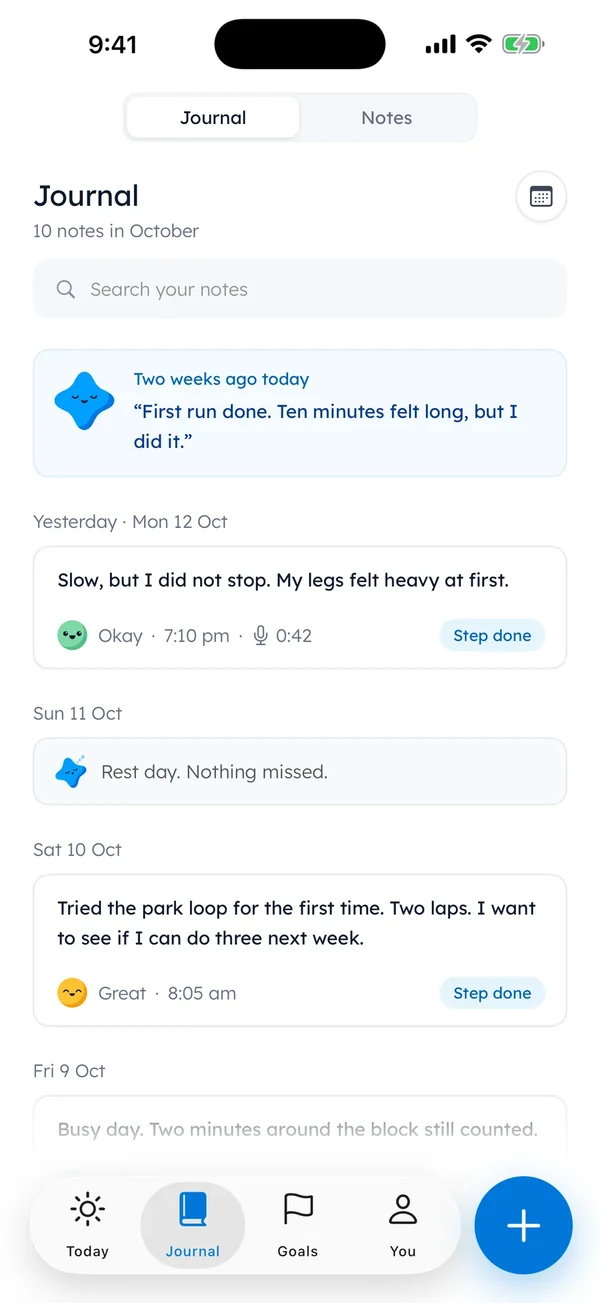
Now the parts where we’re the wrong pick. Better to hear them here than on day 4.
- It’s for iPhone only, so you can’t open your journal on a laptop or a tablet.
- Your journal lives on one iPhone. iCloud Backup includes it when that’s on.
- Settings › Backup also saves your journal and notes to a file you keep.
- The free plan means one goal at a time.
- It’s built for one line a day. Long, photo-heavy entries suit a long-form app better.
There’s no account to make and there are no ads.
The journal help page covers backups step by step. The current Pro price and trial terms are in the Free and Pro section of our home page.
How to pick the best journal app for iPhone
The feature lists can wait a minute. The line you’d write tonight is a better guide, so match the app to the line.
| If tonight’s line would be… | Start with… |
|---|---|
| “Three pages about the wedding. And the cake.” | A long-form archive app |
| “So-so.” | A mood app, or any app with faces |
| “Coffee with Sam. Still thinking about it.” | The built-in journal you already have |
| “Read 10 pages. The book finally got good.” | A small-steps goal journal |
| “Nothing happened. Can’t think of anything.” | Any app that offers a question |
| “I’d rather hold a pen.” | A paper notebook |
The bottom row is real. Pens count.
Some people write better by hand, and a page with crossings-out, a coffee ring and the date scribbled in the corner holds a day in a way a screen doesn’t try to.
And no app beats a notebook that’s already open on the nightstand with the pen inside it.
Start with one line tonight
A new download won’t settle it. One more line in the app you already have probably will.
It can be a very short line. “Tired. Pasta. Bed.” counts.
So does a single word. If the app still feels wrong after a week, the table above has your next row.
And “Starting today” finally has a second line under it.
Questions people ask
Does iPhone have a built-in journal app?
Yes. iPhones on recent versions of iOS include a journal app, so there’s nothing to buy. Apple’s guide says it can offer writing prompts and lock with Face ID or your passcode. Try it for a week before you download anything else.
Is the journal app on iPhone good?
It’s a good free place to start. It handles photos, prompts, a calendar of entries and a Face ID lock. Whether it’s good for you depends on your line: if you want a goal and one small step behind each entry, a goal journal may fit better.
Is a notes app good enough for journaling?
It can be. A dated note a day works, and it costs nothing. What you usually give up is a prompt and a calendar view of past entries. If a blank note keeps staying blank, try an app that asks a question.
Is a journal app private?
It depends on where the entries are stored. Some apps keep them only on your phone, others upload them to an account. The app’s privacy page says which, and a lock helps either way: your iPhone can require Face ID or a passcode to open most apps you download.
What’s the best simple journal app for beginners?
The one that asks the least of you on a tired night. A built-in journal costs nothing to try, and a one-line app keeps each entry tiny. Pick the kind that matches the line you’d really write, then try it for one week.
Sources
TopicJournal apps
You earned the Good Picker badge
You read the whole look. Now give that March entry some company.
0 XP

Yumemira is an iPhone app (iOS 18 or later).
More about the daily journalYumemira is free to start. iPhone, iOS 18 or later.