Free journal apps
The best free journal app: what ‘free’ should include
The short answer
The best free journal app lets you write, read back and export your entries without paying. Some free journal apps are free to write in but limit photos, search, a lock or old entries. Before you trust one, check what stays free and whether you can take your words out.
In 30 seconds
- “Free” can mean free to write, not free to keep.
- Check four things: reading back, export, ads and accounts.
- Test any app with three short entries before you commit.
- Set your own reminder the day a free trial starts.
Say an app said free. You wrote on three nights. On night four, a screen asked for a yearly price to show you last week.
Nothing was deleted. It just wasn’t yours to read anymore.
We make an iPhone journal with a paid plan, so we’re on the selling side of this page. Read us with one eyebrow up.

Reading XP0 XP
How journal apps are priced
The word “free” on an app page works like “light rain” in a forecast.
It’s true. It just isn’t the whole sky.
So sort it out before the first entry. The basics of how to journal on your iPhone are the same in every app. The price tag isn’t.
Journal apps pay their bills in a few common ways, and each one decides what “free” covers. There’s also a fifth kind, where nobody seems to pay at all.
| Model | Usually free | Check this |
|---|---|---|
| Free with ads | Writing | “What do the ads track?” |
| Free tier + subscription | Writing, a few features | “What’s locked after the trial?” |
| One-time purchase | Everything you bought | “Are later updates included?” |
| Built into your phone | Writing | “What does it share with my phone?” |
| Free, no ads, no account | Writing, export | “Who pays for it?” |
Row two is us, by the way.
Every row can be fair, can’t it? Ask the last column’s question before writing anything personal, because the answer shows who the app is working for.
The catch in each row
- A one-time purchase sounds simple. But a big update can arrive as a new paid app, and the old one may stop getting fixes.
- Built-in apps cost nothing extra. They live inside your phone’s settings, though, so read what they can see before switching on every suggestion.
- Free with no ads and no account sounds lovely. It still deserves one more question.
Find out who pays before a year of writing.
A side project can stop on a random Tuesday (its maker gets a new job, or a new baby, or both).
What the best free journal app keeps free
A fair free tier doesn’t need every feature. It needs the parts that keep your words yours: finding them, and taking them with you.
A fair free tier, in six checks
Ticks stay in this browser. Nothing is sent.
Export is the easy check to skip.
But it’s probably the one that matters most, on the day a phone gets replaced or an app stops feeling right.
Don’t write a year where you can’t export.
Photos, themes and fancy charts can sit behind a paywall, and nobody gets hurt. But your sentences shouldn’t.
The whole test works in bed with one thumb, under the blanket, with the phone at 14% and the charger somewhere on the floor where it always ends up.
“Test one. Rice again.” is a perfectly good entry.
Yumemira’s Free and Pro, exactly
Here’s our own split, taken from the app’s code. And yes, hold us to the checklist above.
Yumemira, the small-steps goal journal for iPhone, asks for one small step a day toward something you want. Then you write one line about how it went.
Free gives you one goal at a time and the whole journal.
| Feature | Free | Pro |
|---|---|---|
| Goals | One at a time | As many as you like |
| Journal: one line, faces, voice, photos | Yes | Yes |
| Month calendar and search | Yes | Yes |
| Year view | No | Yes |
| Insights | No | Yes |
| App lock | No | Yes |
| Export | Text and backup file | Plus PDF or picture |
| Ads | None | None |
Three lines from the app itself are worth repeating:
- “Your daily step stays free either way.”
- “Every badge is free to earn.”
- “Rest days are never for sale.”
By our own checklist, we lose a point: the app lock is Pro.
On Free, your iPhone can still lock the app if you touch and hold its icon and tap Require Face ID, the way Apple’s guide (opens in a new tab) shows it.
A free switch also hides your words in notifications, widgets and on the Lock Screen.
No account. Your journal stays on your iPhone. With notifications on, the app reminds you two days before the first payment.
If you stop paying
Pro stays on until the day you paid for.
After that you keep all your goals and notes, and every goal you have keeps going. Only the Pro parts close, like starting another goal.
So the lines you wrote on a Monday in March, with the faces you picked and the photo of the leaning bookshelf, stay where they were.
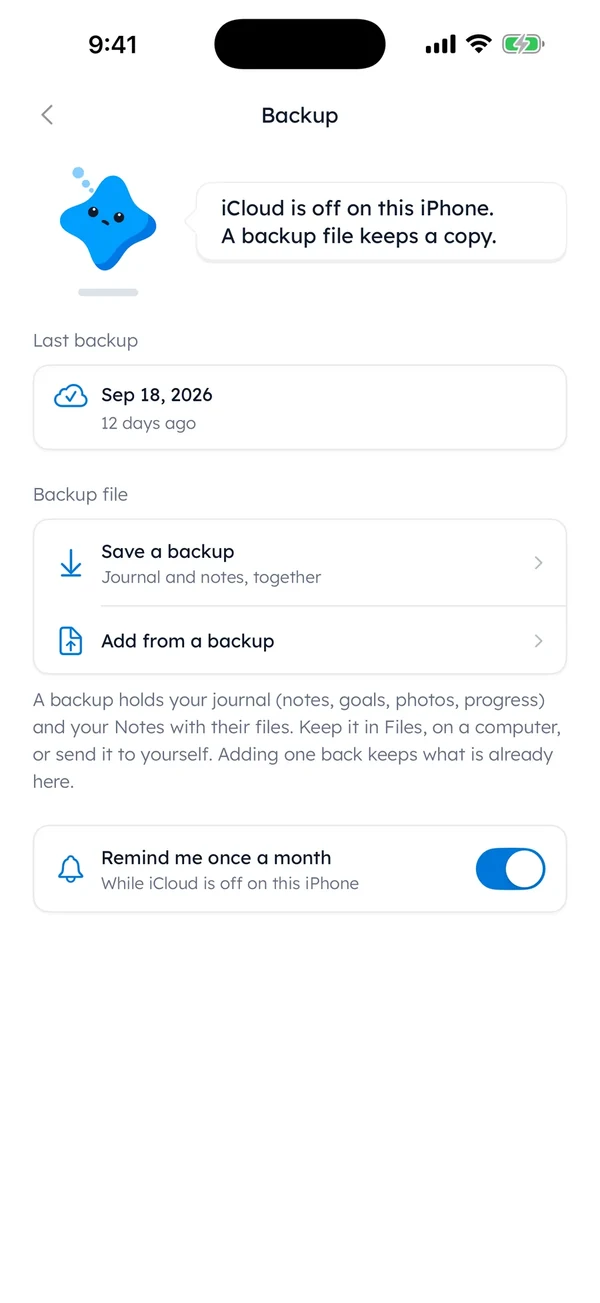
So export, in plain words, is that screen.
Save a backup writes your journal and notes to a file you keep. The journal help page shows the steps.
For a copy in two places, there’s more on backing up a journal. The full plan list sits in our Free and Pro section.
How to cancel a free trial on iPhone
Every App Store subscription on your iPhone is cancelled in the same place, ours included. Apple’s page on how to cancel a subscription (opens in a new tab) has the official steps.
Open Settings.
Then tap your name at the top.
Tap Subscriptions.
Your Apple subscriptions are listed there.
Pick the subscription.
Scroll down if the button is low on the page.
Tap Cancel Subscription.
If there’s no button, it’s already cancelled.
Apple advises cancelling a trial at least 24 hours before it ends.
So the last evening is too late.
Set the reminder the minute the trial starts.
The trial screen’s right there, and the price is still fresh (it won’t be on day six).
Choosing the app, not only the plan
The best journal app for iPhone is the one that gets opened on a tired night. And price is only one row of that.
If a lock matters most, see what a private journal app keeps behind a passcode on its free plan. Our iPhone journal page lists what ours does and doesn’t do.
Tonight, before trusting any app with a real line, write a test one. “Test. Odd socks today.” Then search for it and export it.
Last week’s lines shouldn’t need a yearly price to read.
Questions people ask
Is there a completely free journal app?
Yes. Some journal apps have no paid plan, and some phones include a journal app at no extra cost. Before you rely on one, check that you can search old entries and export them, and think about who pays to keep it running.
Is there a journal app without a subscription?
Yes. Some apps charge once instead of every month or year, and some are free with no paid plan at all. With a one-time purchase, check whether later updates are included or sold as a new app.
Is there a free journal app with no ads?
Yes. Some free journal apps carry no ads, including Yumemira on both Free and Pro. An app’s privacy section on the App Store shows what data the app says it collects, which is worth reading for any free app.
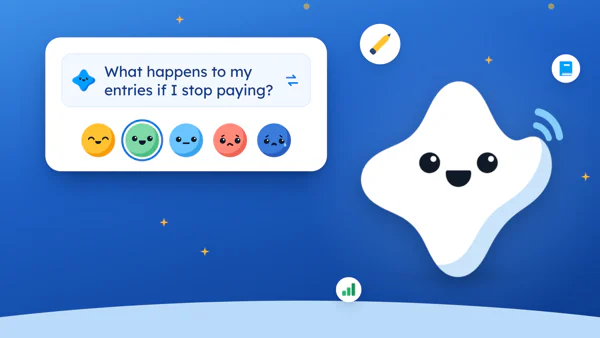
What happens to my entries if I stop paying?
It depends on the app, so look for the answer before you subscribe. In Yumemira, Pro stays on until the day you paid for. After that you keep all your goals and notes, and nothing is deleted. Only the Pro parts close, like starting another goal.
Is there a free journal app with a lock?
Some apps include a passcode lock for free, and others charge for it. In Yumemira, the app lock is part of Pro. On iOS 18, any app can also ask for Face ID: touch and hold its icon, then tap Require Face ID.
Sources
TopicJournal apps
You earned the Good Picker badge
You read to the end. Tonight, write one test line and get it back out.
0 XP

Yumemira is an iPhone app (iOS 18 or later).
How Yumemira worksYumemira is free to start. iPhone, iOS 18 or later.