
Journaling for beginners
Paper vs digital journal: an honest answer for people who quit both
The short answer
Paper vs digital journal: pick the one you can reach without getting up. Paper wins when you want to draw or stay off screens. A phone wins when you need speed or a passcode. Either way, write one line at a time you already stop, and keep it that small for a week.
In 30 seconds
- Choose by the reason your last journal stopped.
- Paper wins for drawing and for nights with no screens.
- A phone wins when the notebook is in another room.
- Keep a second copy of either one.
- Doing both is allowed: phone on weekdays, paper on weekends.
Somewhere in your home there’s a notebook with four pages used. On your phone, an app holds three days of entries from 2023.
Technically, both are still your journal. And both stopped for reasons that had little to do with paper or screens.
We make a small-steps journal for iPhone, so we’re not neutral. A pen works just as well.

Reading XP0 XP
Paper vs digital journal, in one minute
The better journal is the one within reach at the moment you’d write. Where it sits matters much more than what it’s made of.
- In bed, with the phone charging across the room because you finally made that rule stick, a notebook on the nightstand wins easily.
- On a bus, in a queue or on a break halfway through a shift, the phone is already in your hand.
Pick the one you can reach without getting up.
If you’re new to all this, the bigger question is how to start journaling at all. The answer there is small too: one line, right after something you do every day.
Compare them by why people stop
You can compare paper and phones on looks for hours.
Nice paper, nice fonts, a pen that costs more than lunch. That helps if you’re shopping. It helps less if you’ve already quit both.
A journal rarely stops because of its cover. It stops because it got forgotten, felt unsafe, looked messy, cost too much, took too long or went missing.
| Reason people stop | Paper | Phone | Helps either way |
|---|---|---|---|
| Forgot it | Out of sight in a drawer | Lost among other apps | Write right after something you do daily |
| Worried someone reads it | Anyone who finds it can open it | Behind the phone’s passcode | Write other people as initials |
| Pages felt too messy | Crossed-out words stay on the page | Deleting leaves no mark | One plain line, no rereading tonight |
| Cost | A notebook and a pen | Some apps are free to start | Use what you already own |
| Too slow | Needs a pen and a free hand | Type it, or say it out loud | Keep it to one line |
| Lost it | One copy, unless you photograph pages | Gone with the phone, unless backed up | Make a second copy once a month |
Read the right-hand column first. Really. Every fix there works in a notebook and on a phone, which makes the tool the second decision, not the first.
Fix the reason you stopped, then pick the tool.
When paper wins
Paper has real strengths, and pretending otherwise would be silly.
- No battery. It works in a power cut, on a plane and when the phone is at 2%.
- Nothing buzzes halfway through a sentence.
- You can draw: a map of the new route home, the cat, an arrow pointing at a coffee stain.
- You can tape things in, like a ticket stub or a fortune cookie slip that was right for once.
Picture your best writing time. If it’s in bed, with no screen in the room and nowhere to be until morning, a notebook that never asks for a passcode is hard to beat.
But paper’s weak spot is distance.
A notebook in a bag by the front door is no help to someone already under the blanket, with cold feet and no plans to move them.
When a digital journal on your phone wins
The phone’s biggest strength is boring: it’s already in your hand. On nights when the notebook is in the other room, that beats paper quality.
Quick, too.
Type a line on a break, or say it out loud. Apple’s guide to dictation on iPhone (opens in a new tab) says it works in any text box. In many languages it runs on the phone itself, no internet needed.
For the full setup, see how to journal on your iPhone.
Where a small step helps
So the phone wins on reach and speed. Does that fix forgetting?
No.
Forgetting stops a journal on paper and on a phone alike. A phone can at least put something in front of you.
The lines worth keeping are usually about something you did. So Yumemira, the small-steps journal for iPhone, starts with a step. You pick a goal, like reading more, and each day brings one small step.
Start the step.
It stays on your Lock Screen, and in the Dynamic Island on iPhones that have one, with a Done button.
Finish it.
Mira cheers: “Nice. That counts.”
Then write.
Tap Say how it went and answer “How did it go?” in one line.
And it’s hard to have nothing to say about a thing you did ten minutes ago.
On paper, the same trick works fine. Do one small thing, like reading two pages, then write a line about it.
Privacy on paper and on a phone
A paper journal is as private as the place it lives. A notebook in a drawer stays private until someone opens the drawer.
In some homes, that takes about a week.
A phone starts with a lock you already use: the passcode. In Yumemira there’s no account to make, and the journal stays on your iPhone.
Two switches help:
- Hide text keeps your words off the Lock Screen and out of notifications.
- With Pro, the app itself can ask for a passcode or Face ID.
For locks, hiding spots and the awkward “did you read it” talk, see how to keep a journal private.
If it gets lost
A notebook is one copy. So is a phone, unless it’s backed up.
Your iPhone’s own iCloud Backup runs by itself when the phone is locked, charging and on Wi-Fi, according to Apple’s backup steps (opens in a new tab). When it’s on, it includes the Yumemira journal.
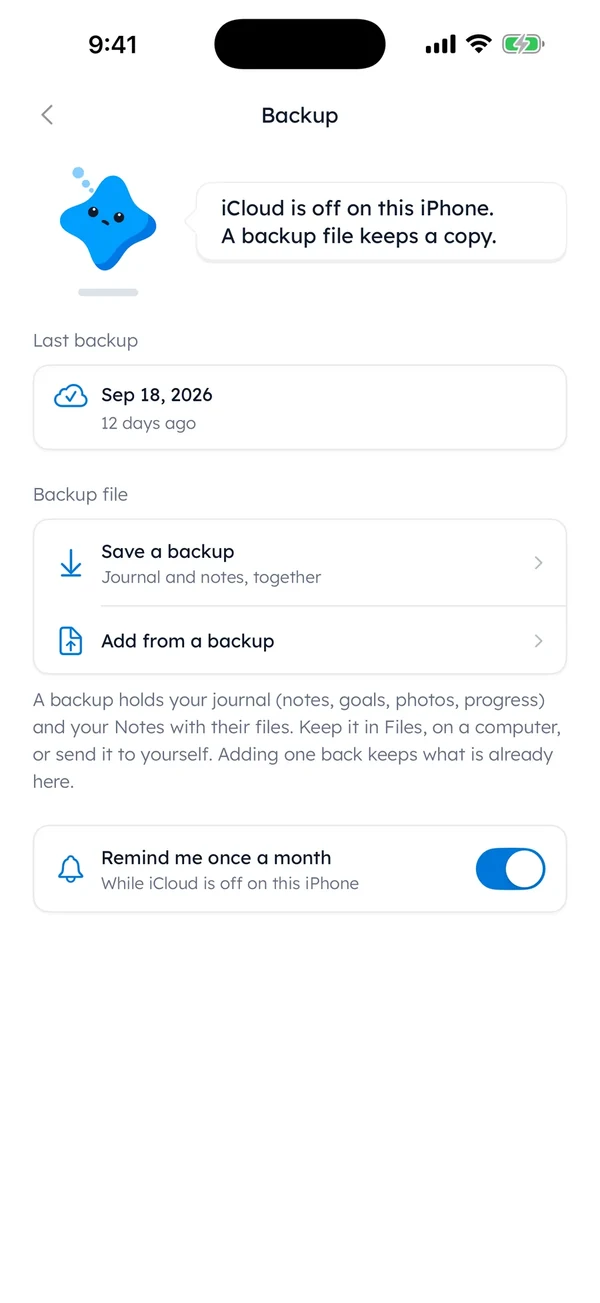
In the app, Settings › Backup saves your journal and notes as a file. Keep it in Files or on a computer, so your one line a day on your iPhone has a spare.
On paper, the backup is a photo of each full page, taken once a month.
Keep a second copy somewhere the first one isn’t.
Messy pages and perfect apps
Paper has a perfection problem of its own.
Picture a new notebook. It has a hard cover and thick cream paper, the kind of paper that makes a shopping list look like it should have dressed up a bit more.
Page one starts to feel like an exam you didn’t study for. And the safest answer to an exam like that is a blank page.
A phone hides the crossing out. But the urge to write something impressive comes along anyway, and so does a blinking cursor in an empty box.
One plain move works for both: write it badly on purpose, once. “Bad soup. Early night.” is a real line, and it takes the shine off page one.
If this is the part that stops you most, there’s more on perfectionism in journaling.
Phone or notebook? Doing both
Nothing says a journal has to live in one place.
One split worth trying: a line on the phone on weekdays, and paper at the weekend, when there’s time for a pen.
| Day | Where | A line it might get |
|---|---|---|
| Mon | Phone | “Read 10 pages on the bus. Nearly missed my stop.” |
| Tue | Phone | “Late shift. Noodles at the counter.” |
| Wed | Phone | “6 glasses of water. The plant got the rest.” |
| Thu | Phone | “Nothing happened today, except the rain stopped.” |
| Fri | Phone | “Tired.” |
| Sat | Paper | “Market. Bought far too many tomatoes.” |
| Sun | Paper | “Copied Thursday’s line in. Still true.” |
The weekend page turns into a slow look back at the phone lines, written with a second cup of tea going cold beside the notebook while nobody needs you for anything.
Slow, on purpose.
You don’t have to keep the split forever.
Try it for a week, then keep whichever side you actually opened.
So, back to that notebook with four pages used. It still has plenty of room.
Page five can be tonight’s line.
Questions people ask
Is journaling digitally or physically better?
Neither is better for everyone. Paper suits drawing and writing away from screens. A phone suits writing on the move, privacy behind a passcode and speed. Choose the one you can reach at the time you write, then try it for a week.
Should I journal on my phone or in a notebook?
Use a notebook if you write in one fixed place, like your bed or a desk. Use your phone if your writing time moves around or happens away from home. If you can’t decide, write on the phone on weekdays and on paper at weekends.
Is a digital journal private?
It depends on the app. Check where entries are stored, whether you need an account and whether the app can lock. Yumemira keeps your journal on your iPhone with no account, can hide text on the Lock Screen and adds an app lock with Pro.
Can I switch from paper to digital without losing old entries?
Yes. Keep the old notebooks where they are, or photograph each full page so a second copy exists. Then start the new journal with tonight’s line. You don’t need to type up the old entries first.
Sources
TopicStart journaling
You earned the Good Picker badge
You compared them fairly. Now write one line in whichever is closer.
0 XP

Yumemira is an iPhone app (iOS 18 or later).
Yumemira on iPhone: Lock Screen and widgetsYumemira is free to start. iPhone, iOS 18 or later.