
Work journal
Productivity journal: a daily note about your work

The short answer
A productivity journal is one line a day about your work: what moved, who helped, or what got stuck. Write it at a time you already stop, like closing your laptop or the end of a shift. Add the date and a word for how it went. Keep it that small for a week.
In 30 seconds
- One line per workday is enough.
- Write what moved, who helped or what blocked you.
- Tag the lines you’ll want back at review time.
- Read the month back on its last Friday.
Your calendar remembers every meeting you sat in this year. It has no idea what happened in any of them.
So when a review form asks about March, March comes back as one word: busy.

Reading XP0 XP
What is a productivity journal?
It’s a work log with a little more memory in it. Each workday gets one short line about what moved, who helped or what got in the way.
That’s the whole format.
No planner pages, no habit grids, no color-coded system that lasts until the second Thursday (we’ve all bought the highlighters).
So why bother? Because a line you write today is a fact you’ll need in six months, when a manager, a form or your own résumé asks what you actually did.
Write it down on the day it happens.
If you’ve never kept a journal of any kind, the same one-line idea is in our guide on how to start journaling. This is that idea with a work badge clipped on.
What to write in a work journal
Five kinds of line cover nearly every workday, whether you sit at a desk, drive a delivery route, teach a class of thirty or work the late shift.
You only need one of them per day.
| Line type | A line it might get | Where it helps later |
|---|---|---|
| What moved | “Shipped the new invoice form. Two bugs, both fixed by 4.” | A review: what you delivered |
| Who helped | “Support walked me through the old billing code. Saved a day.” | Thank-you notes and team feedback |
| What blocked you | “Waiting on legal sign-off since Tuesday. Asked twice.” | A one-on-one: what you need |
| A number | “Cut the weekly report from 40 minutes to 15.” | A résumé bullet |
| Something new | “Ran the client call alone for the first time. Went fine.” | The growth part of a review |
Look at the middle column. Every line names a task, and most of them also name a person or a number, which is the detail your memory throws out first when the week gets loud.
Six months on, those are the first details to go.
Name a person or a number in every line.
When the day was all meetings
Some days, nothing you touched looks finished. But those days still have a line in them.
For more ways into a line, see how to start a journal entry. And if bullets suit you better than sentences, a three-item list works too, as in list journaling.
How to keep a work journal for performance reviews
The method takes about a minute a day and ten minutes a month. Here’s the whole thing.
Pick your stop.
Closing the laptop, the last stop on the train home, hanging up your work badge. The line goes right after.
Write one line.
Any of the five kinds above. On a busy day, five words will do.
Tag a few.
Add a mark like #win or #blocked. On paper, a star in the margin does the same job.
Do a monthly read.
On the last Friday of the month, spend ten minutes and copy your best three lines onto one page.
Bring that page.
Before a review, a one-on-one or a résumé update, start from the page instead of from memory.
Step 4 is the one that pays. Ten minutes a month turns thirty scattered lines into three you can say out loud in a meeting.
No notes needed.
Read the month back before anyone asks about it.
The brag document, one line at a time
Software engineer Julia Evans makes a similar case in her post on writing a brag document (opens in a new tab). You forget your own work, she points out, and your manager can’t remember all of it either.
Her version is a longer document you update now and then, written with tech jobs in mind.
A daily line is the small version. And it fits any job with a review form.
Keeping it on your phone (Notes, #tags and search)
We make an iPhone app, so we’re biased here. A pocket notebook in your work bag works just as well, and nobody has ever had to update one.
Most lines worth keeping are about something you did. So Yumemira, the small-steps journal for iPhone, starts with a step toward something you want, like reading more.
When the step is done, Mira cheers “Nice. That counts.” Then Say how it went asks “How did it go?” while you still remember.
For the work log itself, Notes sits right beside the journal. Keep one note a month and add a #work tag.
The tag then shows up as a filter above your notes. At review time, type a client’s name into Search notes and the lines turn up.
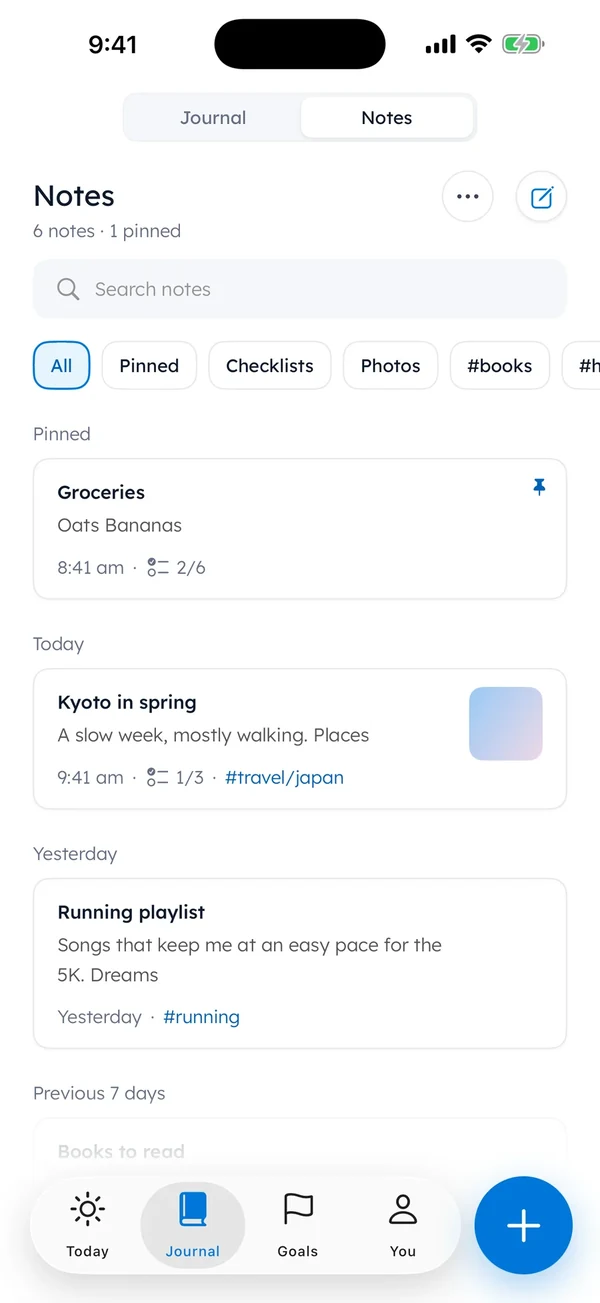
Paper or phone, the tag does the same job. It lets next March’s you skip two hundred lines about meetings and go straight to the six that matter.
A line for every kind of workday
Workdays come in a few shapes, from back-to-back meetings to the one where the system went down at ten and lunch was spent reading error messages.
Each shape gets a line.
| If today was… | Write something like… |
|---|---|
| All meetings | “Four meetings. We agreed on the launch date: the 14th.” |
| Firefighting | “System down at 10, back by 11:30. Wrote up what broke.” |
| Nothing finished | “Halfway through the budget sheet. Columns A to F done.” |
| Stuck waiting | “Still waiting on the vendor quote. Asked again at 3.” |
| A good one | “Client said yes to the second draft.” |
| A rough one | “Rough day.” |
A half-finished task is still progress, and it’s the kind you’ll forget fastest.
Columns A to F are real work, even if nobody claps for columns.
A half-finished task still gets a line.
If you’d like a fuller end-of-day record, a done list does the same job in three to five lines. The same plain, practical format also shows up in our guide to journaling for men.
Start with tonight’s line
Monday and a fresh notebook can wait.
Today’s work is still sitting in your head, the names and the numbers and the thing that broke before lunch, so it’s the easiest line you’ll get all week.
Use it.
Tomorrow, write the next one at your stop. Your calendar will keep the meetings.
Now something keeps the work.
Questions people ask
What is a productivity journal?
It’s a short daily record of your work, usually one line about something you finished or someone who helped. Over a few months, those lines become a record you can use at review time or when you update a résumé.
What should I write in a work journal?
Write one concrete fact from today’s work. Name a task plus a person or a number, like “Cut the weekly report from 40 minutes to 15.” If nothing finished, write where you stopped, so tomorrow starts there.
How do I use a work journal for a performance review?
Tag the lines you’ll want later, then read each month back on its last Friday and copy the best three onto one page. Before the review, start from that page instead of trying to remember the whole year.
Should a work journal be on paper or on my phone?
Either works. Paper suits a desk job with a notebook nearby. A phone suits shift work and commutes, and search makes old lines easier to find. Pick the one that’s in your hand when the workday ends.
Is a work journal the same as a to-do list?
No. A to-do list looks forward at what’s left. A work journal looks back at what happened, including the things that were never on any list. You can keep both, since they do different jobs.
Sources
TopicStart journaling
You earned the Small Step badge
You read to the end. Tonight, write one line about today’s work.
0 XP

Yumemira is an iPhone app (iOS 18 or later).
More about the daily journalYumemira is free to start. iPhone, iOS 18 or later.