
Journal prompts
Random journal prompt: tap for a question you can answer fast
The short answer
A random journal prompt is one question picked for you, so you skip the choosing and go straight to writing. Tap the shuffler below and answer the first question you can finish in one line. If it doesn’t fit, tap again. Try it right after something you do every day, for one week.
In 30 seconds
- Let the page pick the question, then answer it in one line.
- Tap a face to get questions that match how today felt.
- Reroll three times at most, then answer whatever is showing.
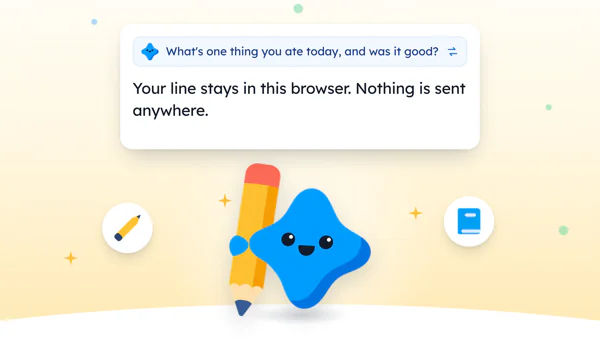
- Your line stays in this browser. Nothing is sent anywhere.
In 1975, the musician Brian Eno and the painter Peter Schmidt published a deck of cards called Oblique Strategies (opens in a new tab). When the work got stuck, you shuffled the deck and drew one card.
The deck was made for artists, and it promised nothing. But the idea fits a journal well.

Reading XP0 XP
Tap for a random journal prompt
Here’s the shuffler. Tap Another question until one looks easy, then write your line in the box.
Write your first line
What did you get right on the first try today?


Five plain words are enough.
Your line stays on this device. It is saved only in this browser and never sent anywhere.
It draws from the 35 questions further down this page, which we wrote ourselves and sorted by the five faces you’d also find in the app.
If you’d rather just write, the Write without one button clears the question and leaves you an empty box.
Want a longer list to browse instead? The pillar guide has 120 journal prompts sorted by mood, and each of them fits in a line.
Why let the page pick the question
A list of 100 prompts is lovely on a slow Sunday afternoon.
Late on a weeknight it’s a different job. The phone charger only works at one angle, the day is still loud in your head, and scrolling 100 questions to find the right one starts to feel like homework.
So a shuffle skips that job.
You don’t have to like the question. You only have to be able to answer it, and the first noun that comes to mind is usually enough.
But tapping is fun. Some nights you could reroll for ten minutes and write nothing, which is the same blank page with better animation.
Three taps, then answer whatever is showing.
And if you really can’t answer it, that’s a line too: “Didn’t like the question. Too tired for it.”
Nobody’s grading this.
How to answer a random prompt in one line
The fastest answer is one thing you could photograph: a place, an object, a person or a meal. One small detail after it finishes the line.
So a question like “What do you want to keep from today?” doesn’t need a speech, and “The window seat on the bus, sun on one side of my face” is a perfectly good reply.
| If the shuffle shows… | Write something like… |
|---|---|
| “What did you get right on the first try?” | “Parked straight, first try. Nobody saw it.” |
| “What’s the last thing you put away?” | “The umbrella that didn’t open. Back in the cupboard.” |
| “Which part of today went on too long?” | “The meeting about the next meeting.” |
| “What’s one part of it you can act on?” | “Email the landlord about the tap tomorrow.” |
| “What made today hard, in a few words?” | “Long day. Glad it’s over.” |
They’re plain on purpose. Answer the question you got, not a better one.
And the page has no opinion about your handwriting, or your spelling.
But if a question sends you somewhere bigger, follow it and keep going. Most nights, one line will do.
A question that’s already waiting
A random question is one way past a blank page. Another is to give the day something to write about first.
On paper, the trick is to do one small thing first, like reading two pages or watering the plant on the windowsill.
Then write a line about it. Something you did a few minutes ago is still fresh, so the words are easy to find.
How the app asks its question
We make Yumemira, the small-steps journal for iPhone, around that trick, so we’re biased here. A pen works just as well.
In the app, you pick something you want, like reading more, and each day offers one small step. When you mark it done, Mira cheers and a button says Say how it went.
For a blank entry in the phone journal, Mira asks a question that fits the time of day.
The app doesn’t shuffle like this page does. Its question changes with the day, and Another question shows the next one in that set.
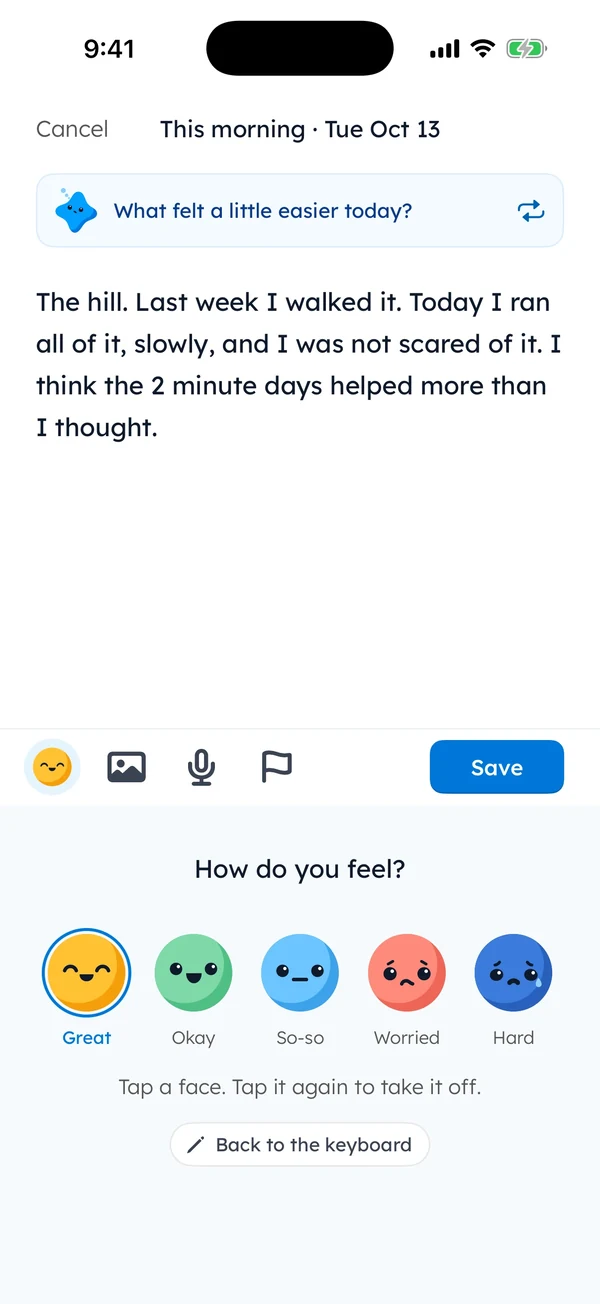
Once you start typing, the question shrinks to a small card. The arrows beside it do the same job as the Another question button.
Either way, the question only has to get you to the first word. The rest of the line is yours.
Random journal questions, sorted by how today felt
These are the 35 questions the shuffler draws from, written by us in plain words so that each one can be answered in a single line, even when you’re half asleep.
Tap a face below, and the shuffler at the top draws only from that face’s group.
How did today feel?
Tap a face. Tap it again to take it off.
Every face is fine.
Your pick stays on this page. Nothing is sent anywhere.
When today felt great
- What do you want to keep from today?
- Who would you tell about today first?
- What part of today would you happily do again?
- What did you get right on the first try today?
- What small thing made the good part possible?
- Which song would fit today?
- What would you write on a postcard from today?
 When today felt okay
- What’s one thing you ate today, and was it good?
- What did you finish today, even a small thing?
- Which conversation from today do you still remember?
- What’s the last thing you put away?
- What did you do today that nobody saw?
- What did the inside of your bag look like today?
- What would you move to a different hour, if you could?
 When today felt so-so
- What was just fine about today?
- Which part of today went on too long?
- What would you skip if today happened again?
- What tiny thing went better than the rest?
- What from today is still on your mind?
- What was the weather doing where you were?
- Which minute of today would you keep?
 When today felt worried
- What’s on your mind right now, in five words?
- What’s one part of it you can act on?
- What went fine today anyway?
- Who could you ask about it?
- If a friend had this worry, what would you say first?
- Which job on your list could wait a few days?
- Which part of it can stay off your mind for a few hours?
 When today felt hard
- What made today hard, in a few words?
- What got you through the worst part?
- What would help a little right now?
- Who was kind to you today, even briefly?
- What’s one thing you did today, however small?
- What can you leave for tomorrow?
- What would make tomorrow a little easier?
The worried and hard groups ask about one small next step on purpose.
Keep hard-day answers short and true. The page doesn’t need the whole story tonight.
Make a random prompt jar on paper
If the phone stays in another room at night, you can copy ten of the questions above onto strips of paper and fold them into a mug by the bed.
Each night you pull one out without looking and answer it in your notebook before the strip goes into a second mug for used questions.
If you’d rather have order than chance, a prompt for every date takes the choosing away in a different way.
And for a first week of writing anything at all, easy prompts for beginners start even smaller.
| This page | A mug by the bed | Yumemira | |
|---|---|---|---|
| How it picks | Random, from 35 questions | Random, from your strips | One a day, by time of day |
| Match how today felt | Yes, tap a face | Sort strips into two mugs | No |
| Account needed | No | No | No |
| Where your line goes | This browser only | Your notebook | Your iPhone |
| Who writes the questions | We did | You do | They come with the app |
Back in 1975, the fix for a stuck afternoon was one card from a shuffled deck.
Tonight, before the phone goes on its charger, tap the shuffler once. Five words will do.
That’s tonight’s card.
Questions people ask
What is a random journal prompt?
It’s a journal question picked by chance instead of by you, from a shuffler or a jar of folded strips. You answer whatever comes up in a line or two. It removes the choosing, which is often the slowest part of starting.
How do I choose a journal prompt?
The easiest way is to let chance choose, then check one thing: can you answer it in one line right now? If yes, write. If not, draw again, up to three times. After that, answer whatever is showing, even with “Too tired for this one.”
What are some fun daily journal prompts?
The fun ones have a small, specific answer: which song would fit today, what you’d write on a postcard from today, or what you did that nobody saw. They’re quick to answer and often funny to read back later.
Sources
TopicJournal prompts
You earned the Prompt Shuffler badge
You found a question. Now answer it in one line before you put the phone down.
0 XP

Yumemira is an iPhone app (iOS 18 or later).
How Yumemira worksYumemira is free to start. iPhone, iOS 18 or later.